Storage
The Storage page provides a unified view of all storage backends configured across your connected Proxmox nodes. Monitor capacity, usage, and content types from a single dashboard.
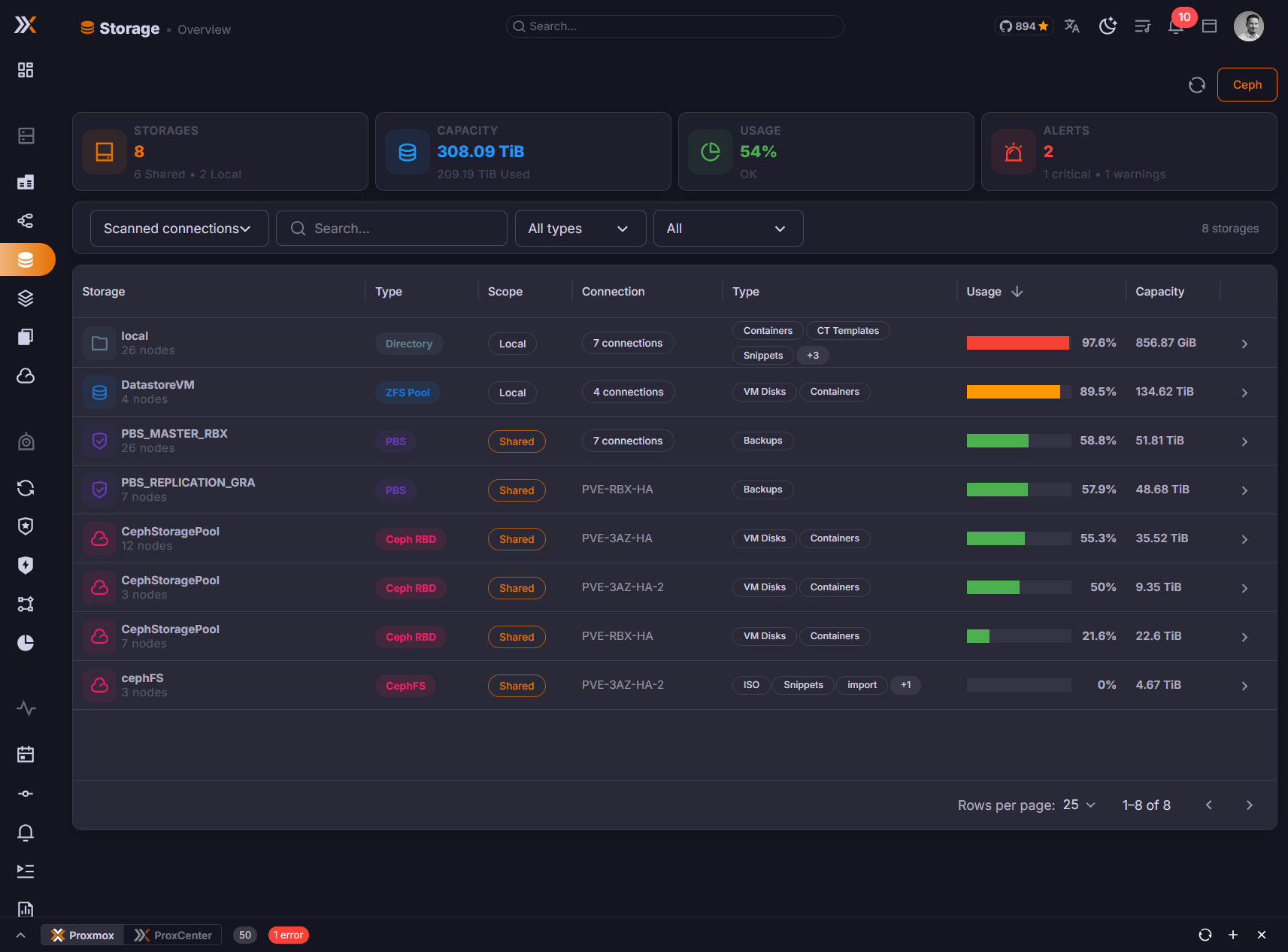
Storage Overview
The overview dashboard displays all storage endpoints detected from your Proxmox infrastructure. Each storage entry shows:
- Name -- The storage identifier as configured in Proxmox
- Type -- The storage backend type
- Node -- Which Proxmox node(s) the storage is available on
- Status -- Whether the storage is currently active and accessible
- Usage -- Visual progress bar with total, used, and available space
Supported Storage Backends
ProxCenter recognizes and displays all storage types supported by Proxmox VE:
| Type | Description |
|---|---|
| Local | Directory-based storage on the node's local filesystem |
| NFS | Network File System shares mounted on nodes |
| CIFS/SMB | Windows-compatible network shares |
| ZFS | ZFS pools and datasets, including ZFS-over-iSCSI |
| Ceph RBD | Ceph RADOS Block Devices for VM disk images |
| CephFS | Ceph Filesystem for shared file storage |
| LVM | Logical Volume Manager block storage |
| LVM-thin | Thin-provisioned LVM volumes with snapshot support |
| PBS | Proxmox Backup Server targets for backup storage |
| iSCSI | iSCSI targets for block-level network storage |
Storage types are detected automatically from your Proxmox node configuration. No additional setup is needed in ProxCenter.
Storage Metrics
For each storage backend, ProxCenter displays the following capacity metrics:
- Total -- The total provisioned capacity of the storage
- Used -- How much space is currently consumed
- Available -- Remaining free space
- Usage percentage -- A visual indicator showing how full the storage is
Keep an eye on storage backends exceeding 85% usage. Running out of disk space on a Proxmox node can cause VM failures and data corruption.
Content Types
Proxmox storage backends are configured to hold specific content types. The Storage page shows which content types each backend supports:
| Content Type | Description |
|---|---|
images | VM disk images (qcow2, raw, vmdk) |
rootdir | Container root filesystems |
vztmpl | Container templates |
iso | ISO images for VM installation media |
backup | VM and container backup files |
snippets | Configuration snippets (cloud-init, hookscripts) |
Each storage entry displays badges for the content types it is configured to accept, making it easy to identify where to store specific resources.
Per-Node Storage View
You can filter the storage list by Proxmox node to see only the storage backends available on a specific hypervisor. This is particularly useful in environments where:
- Nodes have different local storage configurations
- Shared storage (NFS, Ceph) is not available on every node
- You need to plan a VM migration and want to verify storage compatibility on the destination node
Tenant Filtering
On a multi-tenant install, the filter bar carries a tenant filter next to the connection, search, and type controls, so a provider can read one customer's storage without switching tenant and without leaving the page.
It is a multi-select. Every tenant is listed with the number of storage entries attached to it, the provider first and the rest alphabetically, and all of them are selected when the page loads so the page never opens empty. Clear selection unticks everything, and the page then asks you to pick at least one tenant. A Tenant column is added to the table whenever the filter is available.
The filter groups storage by the tenant that owns the connection the storage belongs to, so selecting a tenant narrows the list to the clusters that tenant owns, and the capacity totals above the table follow the selection. Filtering happens in the browser, so switching from one tenant to another is instant and does not refetch anything.
The tenant filter appears for a super administrator working in the provider tenant, and only once more than one tenant exists. An operator who merely holds storage permissions in the provider tenant sees the page exactly as before. The filter itself carries no licence check, but creating the extra tenants it needs is part of Multi-Tenancy, an Enterprise feature.
Only tenants that own cluster connections can be isolated this way. A vDC tenant consumes a slice of a shared cluster instead of owning it, so it is not offered in the filter, and its storage is reported under the tenant that owns the underlying connection.
The selection is deliberately not remembered. Leaving the page and coming back resets it to all tenants.
Storage Policies for vDC Tenants
On a multi-tenant install, a provider can govern what a tenant does with a storage rather than only whether it may use it. A storage policy names a storage of one cluster and carries up to four QoS caps -- read IOPS, write IOPS, read MBps, write MBps. A vDC then attaches the policy with a quota of its own, which turns that backend into a sellable tier. (Enterprise)
Policies are not configured from this page. They live in Settings > Virtual Datacenters > Storage policies, with one card per Proxmox connection, and the full workflow is documented in Virtual Datacenters. What matters when you look at a backend from here:
| Question | Answer |
|---|---|
| Which backends can carry a policy | Shared, enabled storages that advertise images or rootdir content. A local storage is refused, because a guest that lands on one cannot live-migrate |
| How many policies per backend | Exactly one per cluster. Two policies on the same backend would make the tier quota ambiguous, so the picker greys out a storage that is already governed |
| Which clusters | Only clusters still in the provider pool. A cluster handed over whole to an MSP tenant cannot carry a storage policy |
| Who is affected | vDC (IaaS) tenants only. Provider and MSP guests keep whatever QoS options their operator sets by hand |
| What is capped | QEMU VM data disks (scsiN, virtioN, ideN, sataN). Container mount points carry no QoS options and are not capped, and EFI or TPM state disks take no caps either |
The caps are written on the disk line, so Proxmox enforces them. They are applied on every path that puts a tenant disk on a governed backend: creating a VM, adding, editing or importing a disk, deploying from the templates wizard, cloning, restoring, rolling back a snapshot, and moving a disk onto the backend. On a move it is the target backend's caps that are written, since Proxmox otherwise carries the source options across.
Two different numbers describe the same backend and neither is wrong. The Used figure on this page is the whole backend, every tenant and the provider included, read from the Proxmox storage status. The tier bar a tenant sees under Storage tiers in My vDC counts only the volumes of guests in that vDC's Proxmox pool, read from the backend's content listing. A tenant close to its tier quota may therefore sit on a backend this page reports as nearly empty, and the other way round.
Metering a tier from the content listing rather than from declared sizes is what makes an imported disk cost what Proxmox really allocated. Keep that in mind when you size a tier quota: a tenant importing a 200 GB source volume into a disk declared at 1 GB consumes 200 GB of the tier.
Permissions
Access to the Storage page requires the following RBAC permission:
| Permission | Description |
|---|---|
storage.view | View storage backends, their configuration, and usage metrics |
Users without this permission will not see the Storage entry in the sidebar.