HA Reverse Proxy and FQDN
Applies to installs that are accessed through an external URL (for example
https://proxcenter.example.com behind nginx/Traefik/Caddy with TLS, with
or without OIDC/SSO) rather than a bare IP.
What the conversion preserves
NEXTAUTH_URL(your external URL) survives the conversion: the wizard merges the HA settings into the existing.envinstead of replacing it, and the HA compose only falls back tohttp://<VIP>:3000when noNEXTAUTH_URLexists (fresh IP-only installs).- The frontend exempts the external URL's host from the VIP redirect, so requests arriving through your proxy are served, not bounced.
- Keeping the same external
NEXTAUTH_URLkeeps the registered OIDC callback (<NEXTAUTH_URL>/api/auth/callback/oidc) and post-logout URL valid. Verify sign-in and sign-out through that public URL after the conversion.
The one required admin action
Repoint the reverse proxy's upstream at the VIP:
# before (single node)          # after (HA)
upstream -> http://<NODE1_IP>:3000   upstream -> http://<VIP>:3000
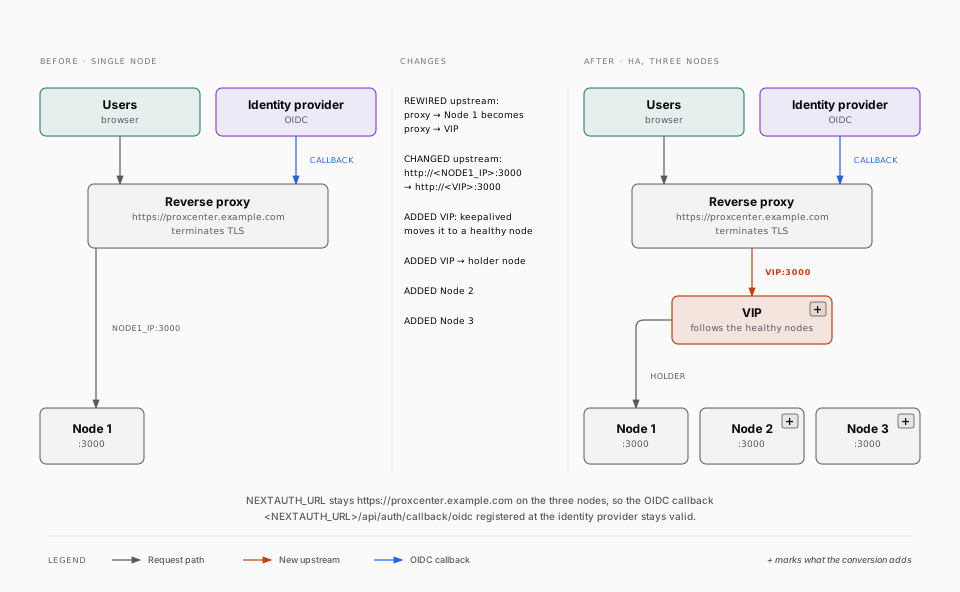
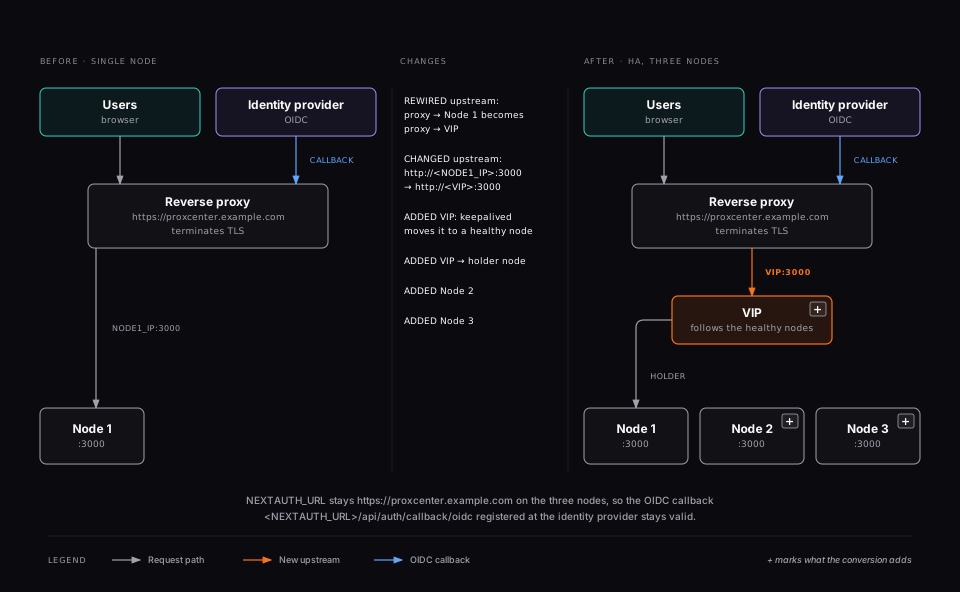
The VIP follows the healthy nodes automatically; the proxy needs no health logic of its own. Keep TLS termination at the proxy exactly as before.
Environment variables
Set in .env on all 3 nodes (the wizard distributes node 1's values):
| Variable | Purpose |
|---|---|
NEXTAUTH_URL | The preserved external URL. Its host is ALWAYS exempt from the VIP redirect. |
HA_REDIRECT_EXEMPT_HOSTS | Optional, comma-separated extra hostnames that must never be VIP-redirected (e.g. a second proxy name, an internal alias). Hostnames only, no scheme or port. |
HA_REDIRECT_DISABLED | Break-glass: true disables the VIP redirect entirely. Use only for debugging; nodes then serve any Host header directly. |
Example:
NEXTAUTH_URL=https://proxcenter.example.com
# HA_REDIRECT_EXEMPT_HOSTS=proxcenter-alias.internal,proxcenter.dmz.example.com
# HA_REDIRECT_DISABLED=true
How the redirect decides
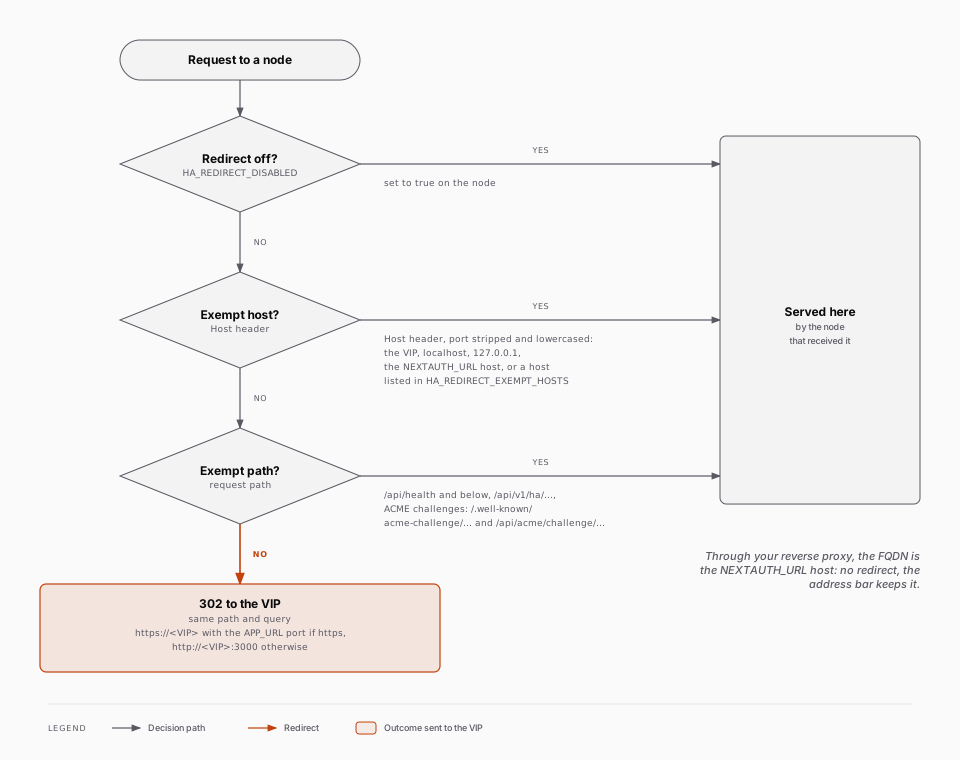
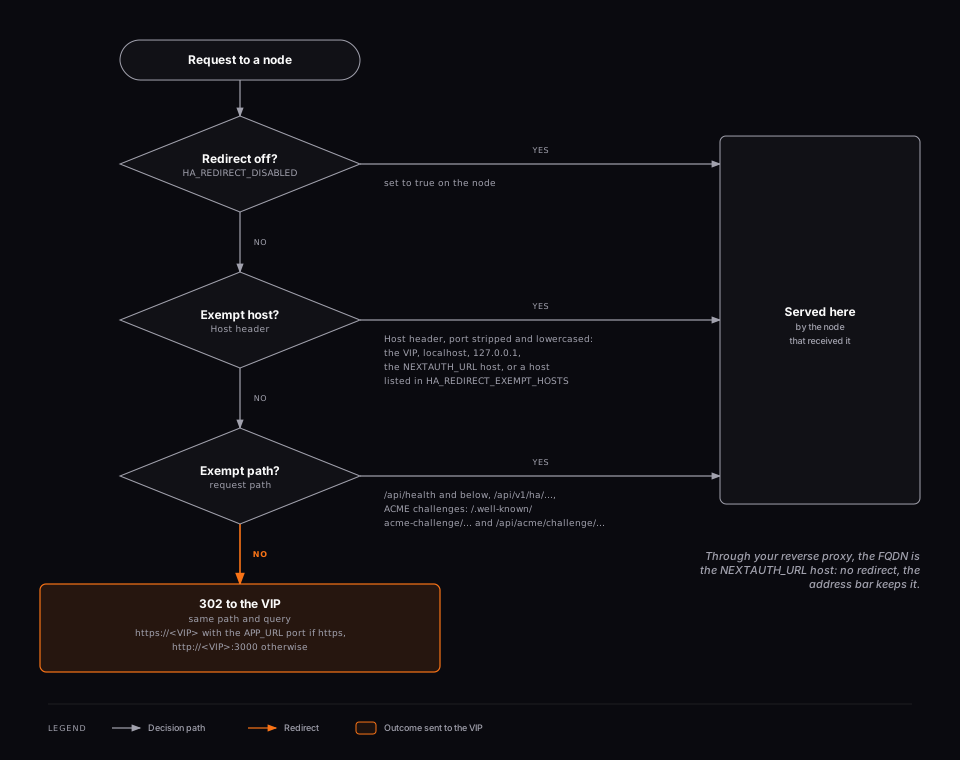
For any request, the frontend compares the port-stripped, lowercased Host
header against: the VIP, localhost/127.0.0.1, the NEXTAUTH_URL host
and the HA_REDIRECT_EXEMPT_HOSTS list. Anything else is redirected (302)
to http://<VIP>:3000 with the path and query preserved. Health probes
(/api/health, /api/health/live) and the HA API are never redirected.
Fresh IP-only installs
Without an external URL, the application is served at http://<VIP>:3000
and the wizard's completion screen reminds you to update OIDC callback URLs
if you add SSO later. Adding a proxy afterwards: set NEXTAUTH_URL in the
.env of all 3 nodes, run docker compose -f docker-compose.ha.yml up -d frontend
on each, then point the proxy at the VIP.
Verify the external access path
After repointing the upstream:
- Open the existing HTTPS FQDN and confirm that its certificate and login page are correct.
- Sign in and open an authenticated page. The address should remain on the external FQDN, rather than switching to an internal node or the HTTP VIP.
- If you use OIDC, complete both sign-in and sign-out through the identity provider. Keep its callback and post-logout registrations aligned with
NEXTAUTH_URL. - Confirm that the proxy can reach the VIP and that long-lived connections, such as consoles, follow the proxy configuration described in Installation.
Preserving the public URL does not change which upstream the proxy uses; update and verify that route separately.