Replication in Operation
How replication lives alongside backups, how a restored guest is re-seeded, and the alerts that watch replication and Ceph.
Backups and Replication
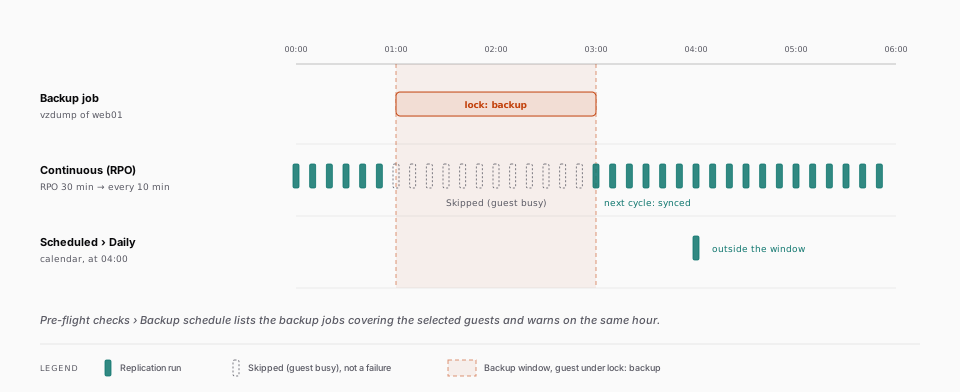
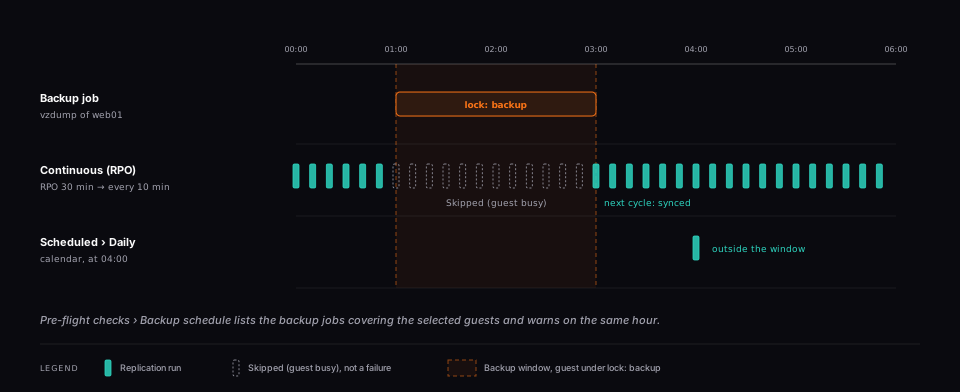
Proxmox holds lock: backup on a guest while vzdump runs. Site Recovery takes the same lock for the few seconds of its source snapshot, and it never takes over a lock it did not place: a guest a backup holds is skipped for that cycle, with the status Skipped (guest busy) and the reason in the per-guest table of the job drawer, and is picked up again at the next cycle. The other guests of the job are unaffected, and a skipped guest is not counted as a failure.
Plan the two schedules so they do not meet. A continuous (RPO) replication necessarily lands inside a backup window from time to time, so keep that window short, or run the replication on a calendar schedule outside it. The job creation preflight lists, under Backup schedule, the backup jobs of the source cluster that cover the selected guests, and warns when the replication runs at the same hour as one of them.
Re-seeding a Guest
A guest restored from a backup with its original VMID keeps its disk names but not its disks: the replica on the DR site shares no history with them. Site Recovery records a stable identity of every source disk after each pass (the RBD image id, the ZFS dataset guid) and compares it at the start of the next one. When a disk was replaced, the guest is reported Re-seed required, with the disk named, and nothing is streamed or destroyed: on Ceph a stream onto the old replica cannot work, and on ZFS it would have destroyed every restore point of the guest.
The Re-seed button on the guest's row asks for a confirmation, then queues a run that drops the replica and every DR restore point of that guest, seeds it again from scratch, and resumes incremental replication. This applies to both engines. While the request is queued the button stays disabled; the orchestrator refuses it while the job is syncing or failed over, while a test failover holds the guest, or while its replica is started from the Emergency DR tab.
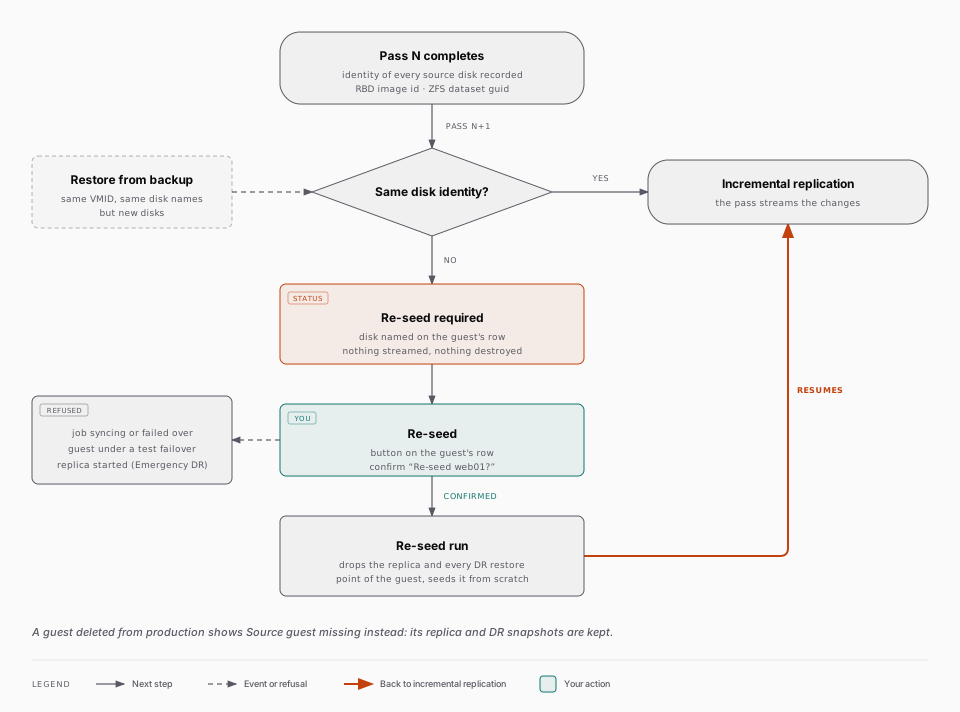
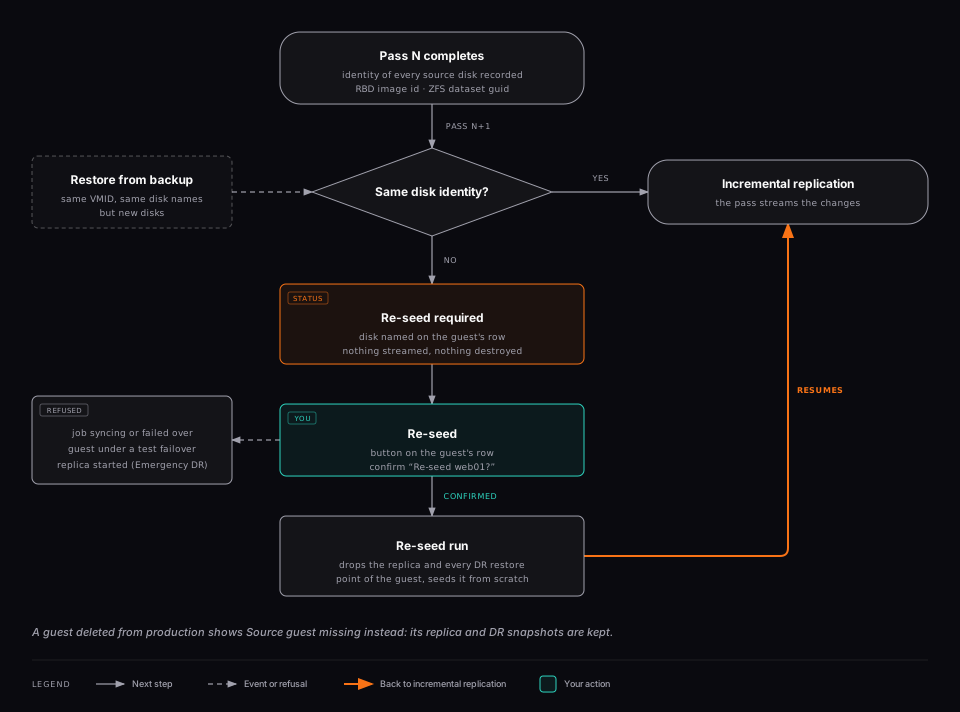
A guest deleted from production shows Source guest missing. Its replica and DR snapshots are kept, and the Snapshots tab flags them as orphans (Source guest missing) so they can be removed from there once the guest is gone for good. Remove the guest from the job, or delete the job, to stop the reports.
Replication and Ceph Alerts
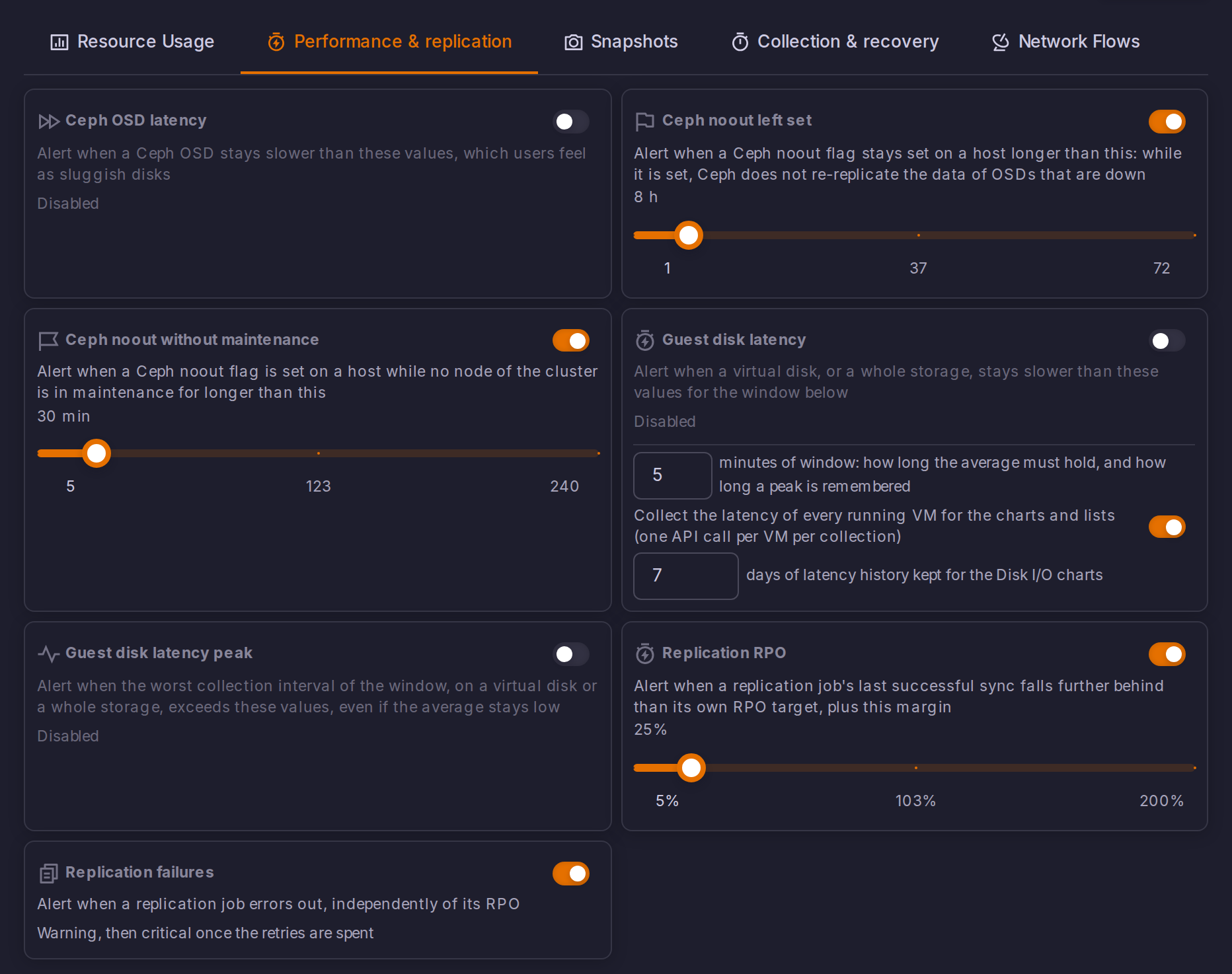
The orchestrator raises three alert types that concern Site Recovery, evaluated once a minute and surfaced on Alerts like any other. They are configured in Settings > Alert thresholds, under Performance & replication.
| Alert | Ships | Raised when |
|---|---|---|
| Replication RPO | Enabled, 25% grace | A job's last successful sync is older than its own RPO target plus the grace margin |
| Replication failures | Enabled | A job is in the error state |
| Ceph OSD latency | Disabled | An OSD answers slower than the threshold you set |
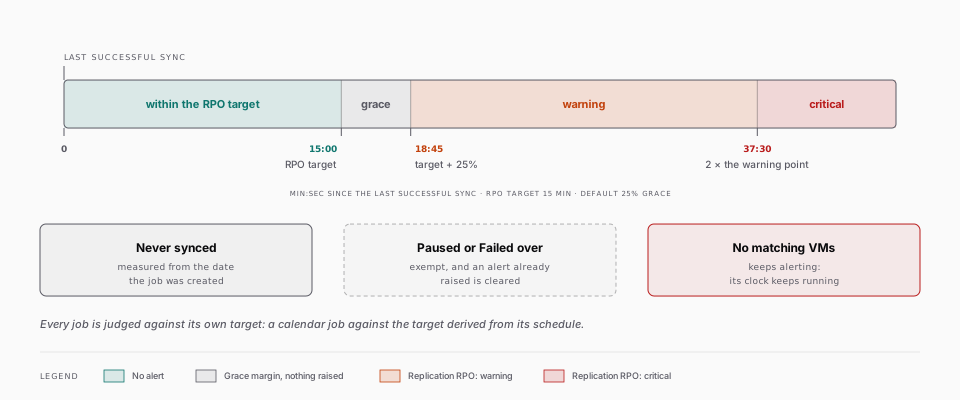
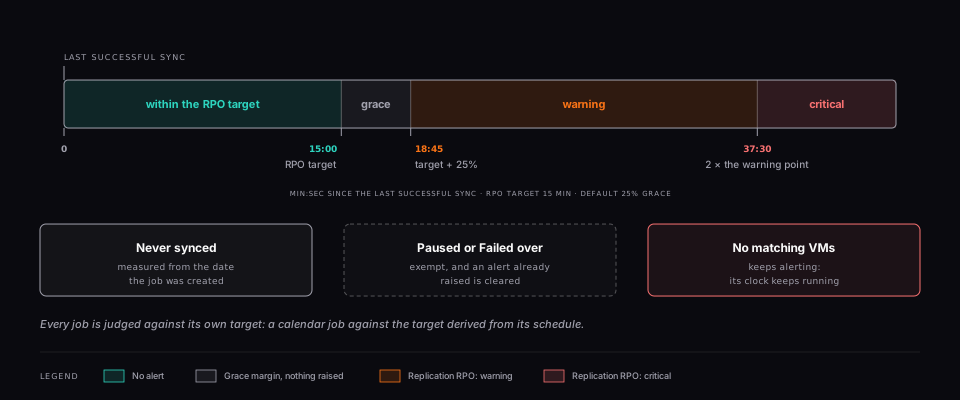
How the RPO Alert Judges a Job
Each job is judged against its own RPO target, with a grace margin that is a percentage of that target, not a fixed delay.
Why the grace margin is a percentage of each job's target
A job set to 15 minutes and a job set to 24 hours have nothing in common, so no figure shared by the fleet can judge both: ten minutes late is meaningless against a 24 hour target and unacceptable against a 15 minute one.
With the default 25% grace, a job whose target is 15 minutes warns once its last successful sync is 18 minutes and 45 seconds old, and turns critical at twice that. A margin is needed at all because a job that is perfectly on time mechanically reaches its RPO just before each run: with no grace, every healthy job would alert.
A few cases are treated on purpose:
- A job that has never completed a sync is measured from the date it was created, so the most broken job in the fleet is not the only one that never alerts.
- A paused job and a failed-over job are exempt, and any RPO alert already raised on them is cleared. One was stopped by an operator, the other replicates in the opposite direction, so the original target no longer means anything.
- A job in the No matching VMs state keeps alerting. Its clock keeps running because a DR job protecting nothing is exactly what somebody needs to be told about.
- A calendar job is measured against the target derived from its schedule. A schedule from which no interval can be derived leaves the check with nothing to compare and it is skipped.
The Failure Alert
Raised as soon as a job enters the error state, and independent from the RPO alert: a job can fail without having missed its RPO yet, and can miss its RPO without ever being marked failed, for instance an unreachable source that leaves the job sitting in pending. It escalates with the retries: warning while attempts remain, critical once the three automatic retries are spent, since at that point nothing will restart on its own. The job's own error message is appended to the alert.
A job in the Partially synced state raises the same alert as a warning: the job keeps running and retries the failed VMs at every sync, so there is no retry budget to exhaust, but at least one VM is not protected and the alert carries the per-VM summary. It clears once every VM syncs again.
While a job is syncing, or pending between a manual Sync Now and its start, the failure alert is neither raised nor cleared: a run in progress proves nothing yet, and counting it as a recovery would clear the alert of any rerun longer than a few minutes only to raise it again at the end.
Deleting a job clears the alerts it had raised, and so does turning the corresponding family off in Settings > Alert thresholds, so a setting you switch off does not leave stale alerts active for ever. Recovery notifications are covered in Alerts.
These three alerts are produced by the orchestrator and read on the Alerts page, both of which are Enterprise. (Enterprise)