Failover and Failback
Running a failover from the Emergency DR tab, bringing workloads back to the primary site, and how the orchestrator keeps reaching a cluster when the node its connection points at goes down. Restore points, source fencing and the lock on a failed-over plan are described with the plans, in Recovery Plans and Test Failover.
Emergency DR
The Emergency DR tab is designed for critical situations where you need to act fast without going through the full recovery plan workflow. It aggregates every replication job and recovery plan into one list, giving operators a single view to manage a crisis.
What sits where. A guest's row carries only the actions that really are per guest. Anything that acts on a whole recovery plan sits on that plan's card header, where its blast radius is legible:
| Level | Action | What it does |
|---|---|---|
| Guest row | Start VM on DR site | Boots that one replica on the DR cluster, from a restore point you pick |
| Guest row | Stop VM on DR site | Powers that replica off again, optionally resuming its replication |
| Plan header | Emergency Failover | Fails the whole plan over immediately |
| Plan header | Plan failback | Opens the plan's failback, the same dialog as Failback |
Plan failback is disabled unless the plan has failed over, under the tooltip "Failback covers the whole plan, and only once the plan has failed over", and reads Open plan failback while one is already running. Emergency Failover is disabled for a plan that is executing, failing back, or already failed over.
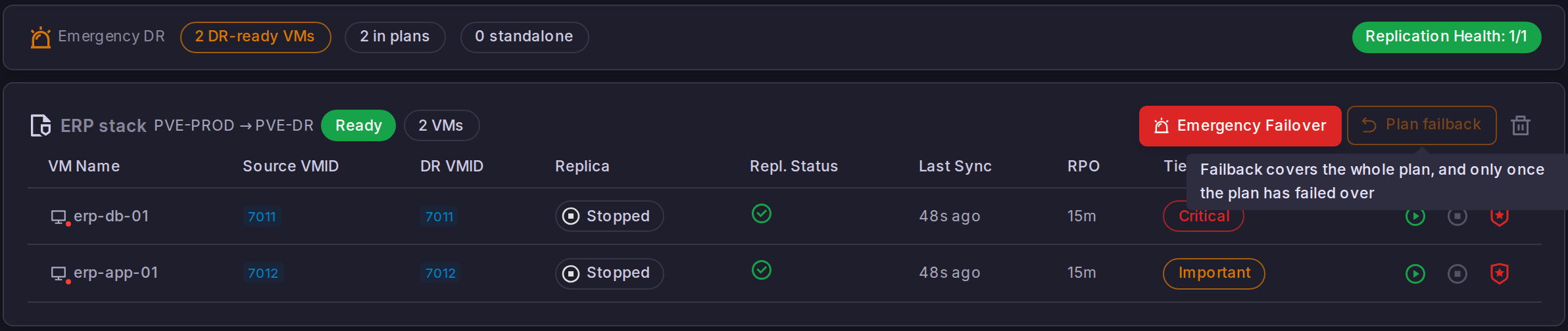
The Replica column. Each row states the live state of the replica it acts on, Started or Stopped, read from the DR cluster's inventory. The chip says started, never running: Proxmox reports a paused guest as running too, and an operator reading "running" on a DR row mid-incident must not be told the replica is serving. The two actions follow that state, so Start is disabled on a replica already up and Stop on one already down, and either action keeps refreshing the lists it changes for a minute afterwards. A guest the orchestrator skips because its replica is up says so on its own line instead of repeating its job's healthy status.
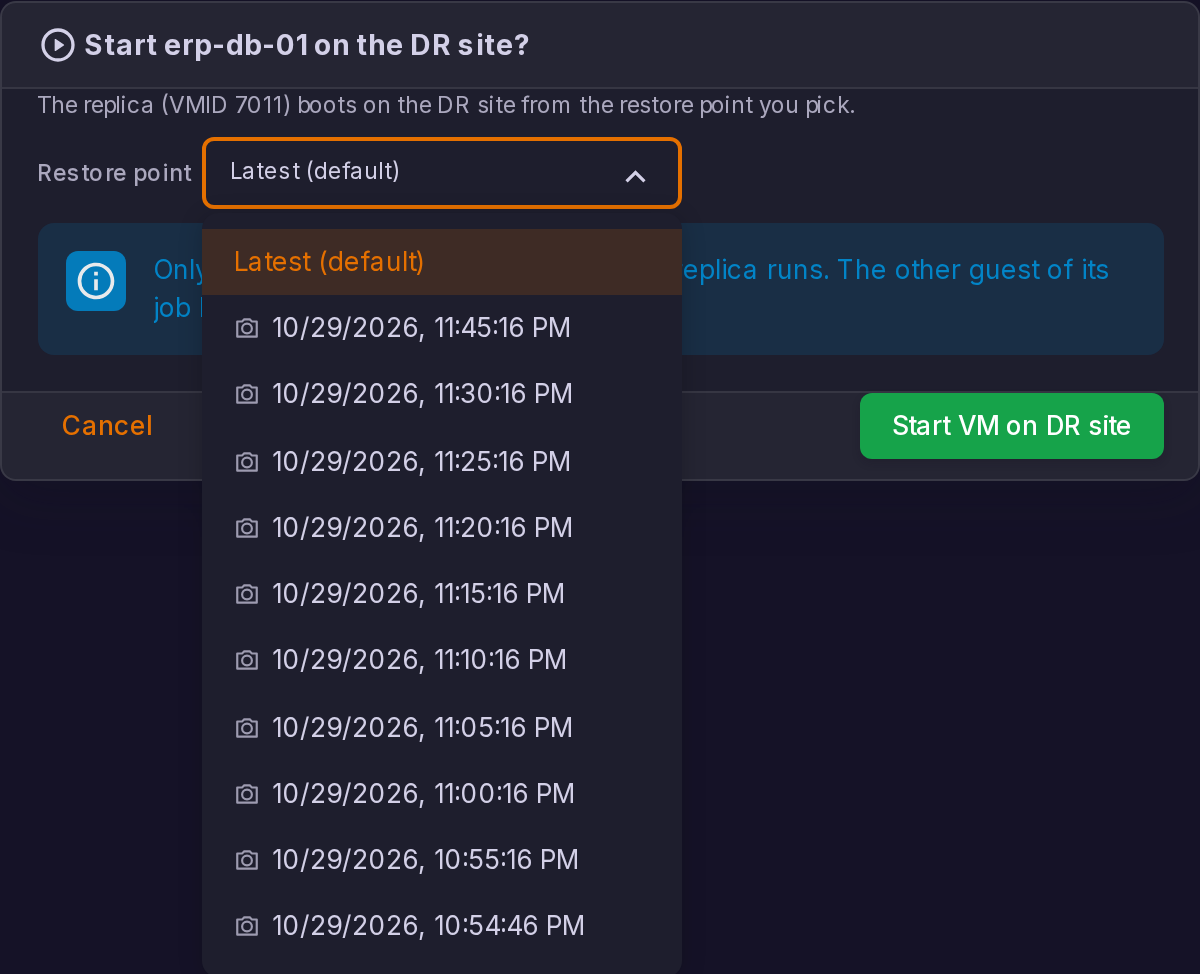
Starting a replica. The dialog offers the restore points of that one guest, newest first, with Latest (default) at the top. The rule is the one a plan failover uses: only a snapshot present on every disk of the guest is a restore point, since booting from one missing on a disk would tear the guest across disk epochs.
Two things the dialog states before you confirm:
- Only that guest stops replicating. Starting a replica claims the guest on its own row; the job keeps running for every other guest it carries, and only a job left with nothing to replicate is paused. The wording follows the count: "Only this guest stops replicating while its replica runs. The N other guests of its job keep going.", or, for a job carrying that guest alone, "This guest is all its replication job carries, so the job pauses while the replica runs."
- Picking an older point keeps the newer ones. Unlike a real failover, an emergency start does not re-base: "The replica boots from that snapshot and the newer restore points are kept: stopping it and resuming replication rolls the image forward to the newest one." An emergency start is meant to be reversible, which is exactly why it must not destroy restore points.
A start is refused while that guest's job is syncing, rather than queued behind it: a transfer is writing to the very disks the start would roll back. The button says so, "This guest's replication job is syncing right now. Starting the replica is refused while a transfer writes to its disks: wait for the sync to end, this button unlocks on its own."
Stopping a replica. The stop dialog powers the replica off and carries a Resume replication for this job switch. Resuming is not free and the dialog says what it costs: "Anything the replica wrote since the last sync is discarded when replication resumes." The replication guard rolls the replica image back to its last mirror snapshot before the next stream. Leave the switch off to keep the job paused and the replica's disks as they are; either way, "This guest rejoins its replication job as soon as the replica is stopped."
Emergency operations bypass the normal validation steps. Use them only when time is critical and you understand the implications of starting replicated VMs without a full plan execution.
Failback
Failback brings a failed-over plan home. It is started from the Failback action in the plan's detail panel on the Recovery Plans tab, or from the shortcut on a VM row of the Emergency DR tab. Like a real failover, it asks you to type the plan name to confirm, under the title Execute Failback.
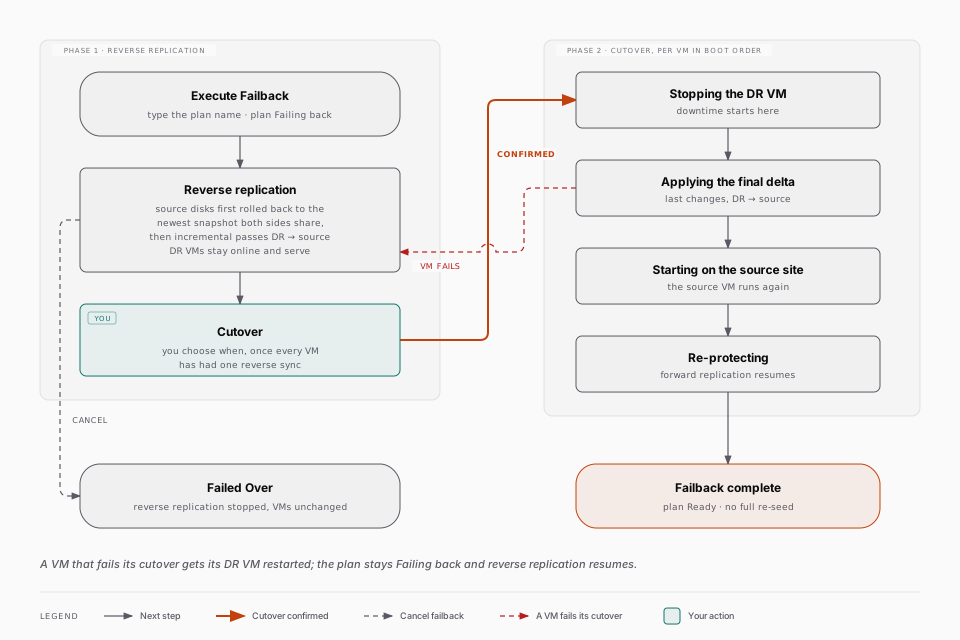
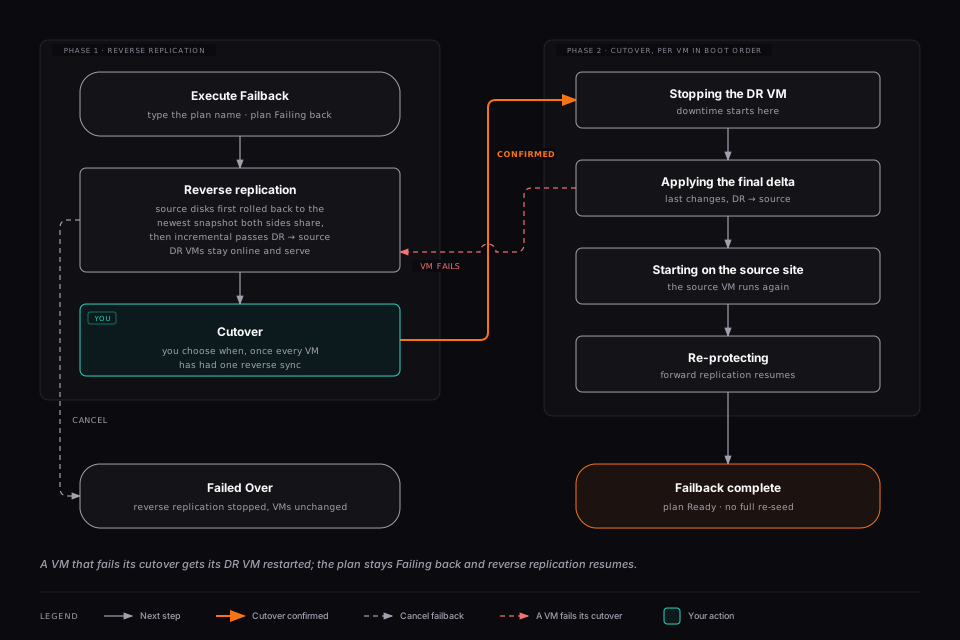
Failback runs in two phases, and the moment you switch from one to the other is yours to choose. Nothing cuts over on its own.
Phase 1: Reverse Replication
Starting the failback puts the plan in the Failing back state and opens a monitor headed "Reverse replication in progress". From then on ProxCenter replicates incrementally from the DR site back to the source, at the cadence of the job, while the DR VMs stay online and keep serving.
Before its first reverse pass, each VM's source disks are rolled back onto the most recent snapshot that both sides still have in common, so the reverse delta has a valid base. That rollback is automatic and per VM.
The monitor is a per-VM table:
| Column | Meaning |
|---|---|
| VM | The protected virtual machine |
| Last reverse sync | When the last reverse pass completed, or No reverse sync yet |
| Transferred | How much data the last pass moved |
The panel states the rule to follow: "Reverse replication is running while the DR VMs stay online. Trigger the cutover when the last sync is fresh enough."
You can close the dialog; the reverse replication keeps running on the orchestrator. While a plan is failing back, its detail panel offers only Open failback to come back to the monitor, and the other plan actions are gone. An orchestrator restart resumes the reverse replication by itself.
The byte counter reads the throughput of the transfer, which requires the pv package on the DR node. Without it the column stays empty. It does not affect the sync itself.
Phase 2: Cutover
When the last sync is fresh enough for the downtime you can afford, press Cutover. ProxCenter asks to confirm with "Stop the DR VMs, apply the final delta and start the source VMs?", then works through the VMs in the plan's boot order. Each one reports its step: Stopping the DR VM, Applying the final delta, Starting on the source site, Re-protecting.
When every VM is through, the dialog reports "Failback complete" and states that the source VMs are running and that replication protects them again in the original direction. The plan returns to Ready, and each replication job goes back to pending and resumes forward replication incrementally from the final delta. There is no full re-seed, and the lock on a job is released only once every VM of that job has completed its cutover.
Cutover readiness. The Cutover button stays disabled until every VM has completed at least one reverse sync, with the tooltip "Waiting for the first reverse sync of every VM". Beyond that first pass there is no automatic freshness threshold: judging when the remaining delta is small enough is the operator's call.
Cancelling. During phase 1, Cancel failback stops the reverse replication and returns the plan to failed over. It confirms first, and it is explicit that nothing is changed on the VMs. Once the cutover has started it can no longer be cancelled, only re-run.
Re-running an interrupted cutover. The cutover is safe to re-run: VMs that already completed it are skipped. If a VM's cutover fails after its DR VM was confirmed stopped, ProxCenter restarts that DR VM so it is not left down, marks the VM as failed with the step it died on, keeps the plan in Failing back, and resumes reverse replication so you can fix the cause and cut over again. The one case where the DR VM is deliberately left stopped is when the source VM was found unexpectedly running, because restarting the DR VM would create a split brain.
- The plan must be failed over. The Failback action is not disabled on a plan in any other state, so on a plan that has not failed over the dialog simply returns the error plan must be failed over to start failback.
- Each VM needs a mirror snapshot that still exists on both the DR and the source images of every one of its disks. When none survives, that VM reports that a full re-seed would be needed, which failback does not support.
- Every DR disk must still have its counterpart in the source VM's configuration on the production cluster: that configuration is what tells ProxCenter which production pool each disk goes back to, so the two sites do not need to name their Ceph pools alike. A disk that exists only on the DR side (added while running there) makes the VM fail with a message naming both images.
- A disk that carries a newer common snapshot than the plan-wide base has to have that stale snapshot removed first; the VM's error names it.
While a plan is failing back you cannot edit it, delete it ("Cancel the failback before deleting this plan."), run a test failover or a failover on it, clean up a pending test, or start a second failback. Each of those is refused with an explicit message rather than silently ignored.
Test failovers and real failovers send a notification; a failback does not. It does appear in the activity feed and in the plan's execution history.
HA Failback
The Failback switch described here belongs to Proxmox HA resources and has nothing to do with the disaster recovery failback above. One returns an HA resource to its preferred node inside a single cluster; the other brings a failed-over recovery plan back from the DR site.
The HA tab lets operators toggle Failback on individual HA resources. Use this when you want a resource to automatically return to its preferred node after the node becomes healthy again.
Failback is configured per resource rather than globally, so you can keep conservative behavior for stateful workloads while enabling automatic return for services that are safe to move back.
Orchestrator Resilience
Site Recovery, like every orchestrated feature, reaches Proxmox through the address configured on the connection. The orchestrator does not go down with the node that address points at. After two consecutive network failures on a connection it probes the other nodes of the same cluster and continues against the first one that answers, then returns to the configured address as soon as that address answers again. The connection you configured is never rewritten. An HTTP error from a node that did answer is not a reason to move; only a genuinely unreachable node is.
How the orchestrator picks a node for guest commands and SSH sessions
It also addresses guest commands to the node that actually owns the guest, looked up from the cluster instead of assumed. A replication job can therefore freeze the guest's filesystem wherever the guest lives, whichever node the connection points at.
Node addresses are discovered from the cluster and stored per node. A node that stops answering keeps its recorded address, so it stays among the failover candidates at the moment they matter.
The SSH sessions Site Recovery opens follow the same rule, including the target of the RBD transfer itself. A replication run, a recovery run or a preflight opens its sessions against the configured connection address, and when that node does not answer it proceeds against the first other node of the cluster that does. A node that answered and refused the session, because of its credentials for instance, is not a reason to move, since every node of the cluster would refuse the same credentials. Nothing is spread across nodes on purpose: a healthy cluster keeps every SSH session on the configured node, so its logs stay in one place and a fault on one node does not turn into an intermittent problem.
A session picks its node once, when it opens: a transfer already streaming to a node that goes down fails that run, and the next scheduled run picks a live node.
A connection marked Behind reverse proxy in Settings > Connections is deliberately excluded, because the point of that option is to reach the cluster through a DNS name and a certificate rather than through node IPs. Its helper text says so: "Disables failover to node IPs (use when accessing via DNS + reverse proxy with SSL)".
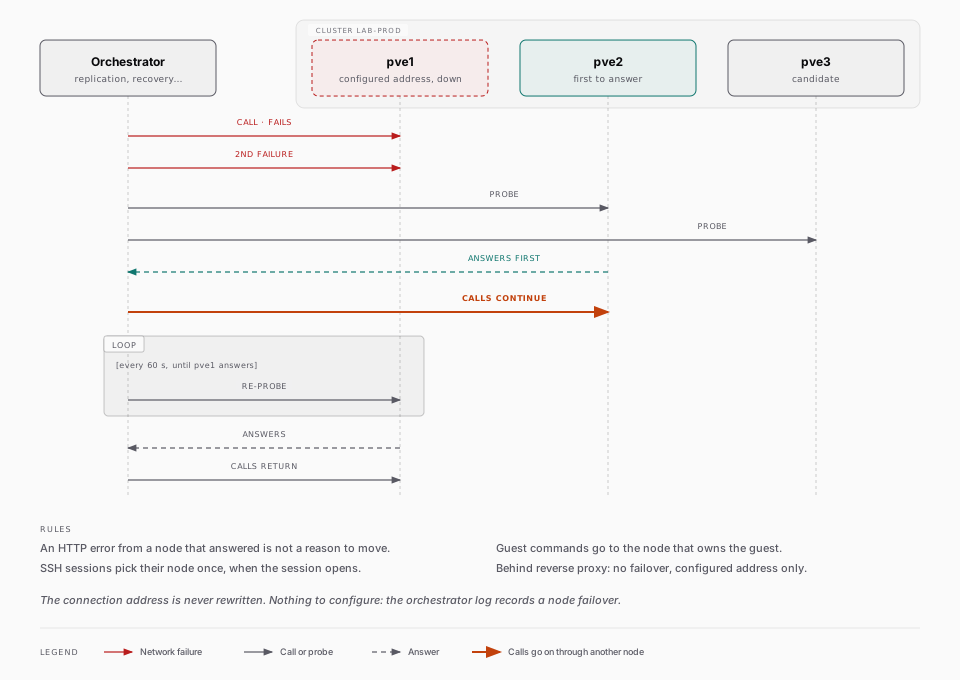
There is nothing to configure for any of this and no indicator in the interface: the orchestrator log is where a node failover is recorded.