Replication Jobs
The Replication tab manages replication jobs. Each job defines what data is replicated, from where, and to where.

Creating a Replication Job
Click Create Replication Job to open the creation dialog. You can configure:
- Replication Engine -- Ceph RBD or ZFS, see Storage Engines. The rest of the dialog follows the choice
- Source connection -- the Proxmox cluster containing the VMs to protect
- What to replicate -- a VMs / Tags toggle. In VMs mode you tick individual guests from the source cluster; in Tags mode you tick tags, and the job protects whatever carries them, re-resolved at every sync
- Target connection -- the destination cluster for replicated data. ProxCenter checks passwordless SSH to it before letting you save
- Target pool, on a Ceph job -- the Ceph pool on the target cluster that receives the replicated RBD images, listed with its usage so you can see what room is left
- Target storage, on a ZFS job -- one choice that names both the
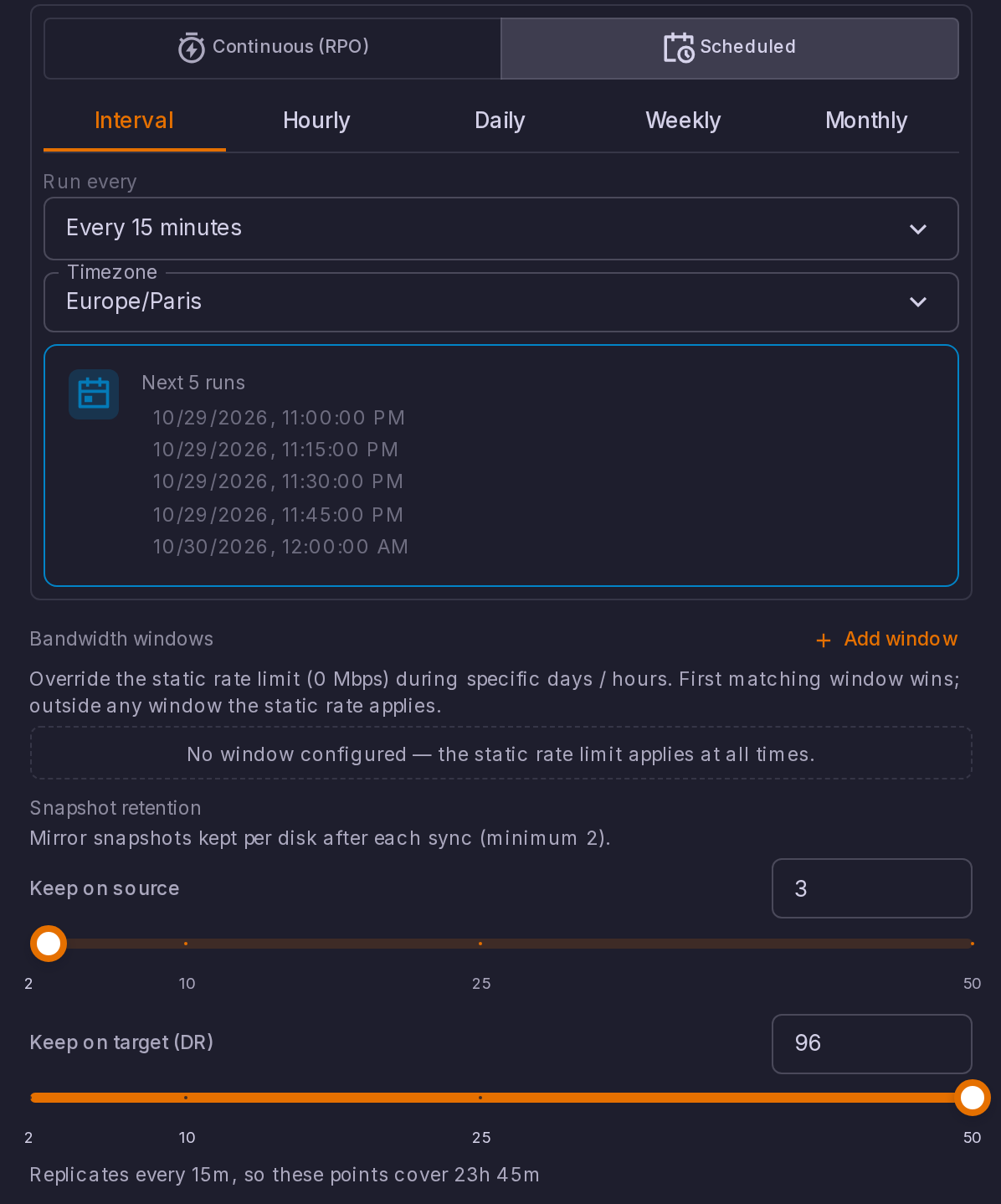
zfspoolstorage receiving the replicated zvols and the single node the replicas live and start on. The edit dialog shows that node as Target node, read-only - Schedule -- either an RPO target, an Interval stated directly in minutes, or a calendar schedule (hourly, daily, weekly or monthly) with its own timezone. See Choosing the Schedule
- Snapshot retention -- how many mirror snapshots are kept on each side, described below
- VMID prefix -- the numbering the replicas get on the DR cluster
- Replica name -- an optional prefix and suffix added to the replicated guest's own name, so production and DR are not same-named twins in the inventory
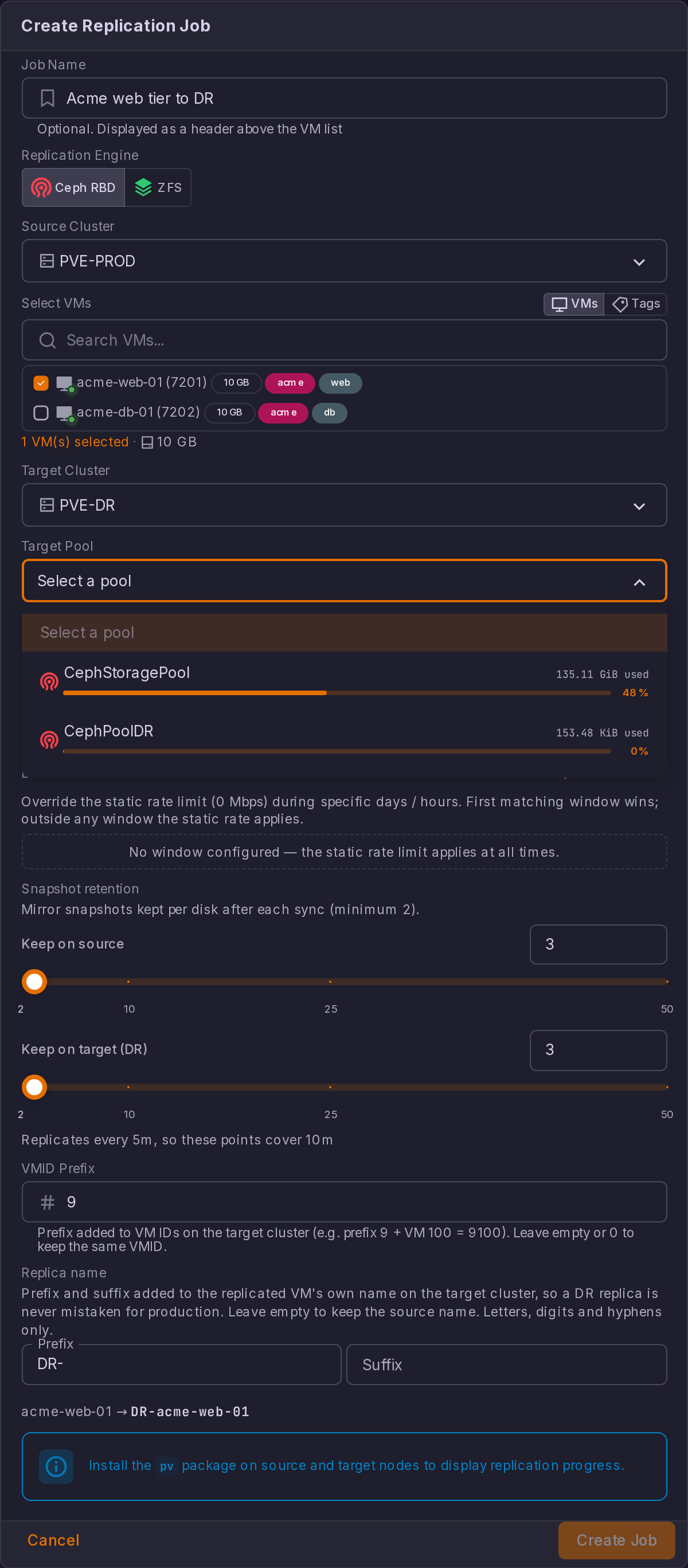
A guest does not have to be running to be replicated. Replication works on the block images themselves, whichever engine carries them, and the one step that does need a running guest, the filesystem freeze that makes a snapshot application consistent, is already skipped per VM when the guest is stopped. Stopped and paused guests are therefore listed in the picker alongside running ones, with their state shown as a coloured dot.
Templates are the exception and stay out of both modes, in the picker and in tag resolution: a replica of a template could not be started at failover, so protecting one would buy nothing.
One Job per Guest
A guest belongs to one replication job and one only. Snapshot housekeeping works per image, not per job: it keeps the newest few mirror snapshots of a source image whoever wrote them, so two jobs on the same guest prune each other's base, and the one left without a common snapshot cannot re-seed on its own.
The picker therefore greys out a guest another job already replicates and names the job holding it, "Already replicated by ...", so you see it while choosing rather than on a refusal after submitting. The server refuses the overlap in any case, the API being reachable without this dialog. The check is made on the source cluster only: the same VMID on another cluster is a different disk and stays selectable.
Choosing the Schedule
The schedule builder offers two modes, Continuous (RPO) and Scheduled.
| Mode | What you state | What it produces |
|---|---|---|
| Continuous (RPO) | An RPO Target | A cadence derived from that target. The orchestrator schedules at a third of the target for margin, so a job whose target reads 30 minutes replicates every 10 |
| Scheduled > Interval | Run every, a cadence in minutes or hours | Exactly that cadence. The picker offers the regular values only: 1, 2, 3, 4, 5, 6, 10, 12, 15, 20 and 30 minutes, then 1, 2, 3, 4, 6, 8, 12 and 24 hours |
| Scheduled > Hourly, Daily, Weekly, Monthly | A calendar, with its own timezone | The occurrences of that calendar. The RPO target is derived from the interval between two runs, and it is that derived target the RPO alerts measure against |
Interval exists because an RPO target does not state a cadence. Asking for a 30 minute RPO and getting a sync every ten is a threefold cost in snapshots for the same retention window: 7 days of restore points at that real cadence does not fit under the 500 snapshot cap. Pick Interval when what you actually want to control is how often the job runs.
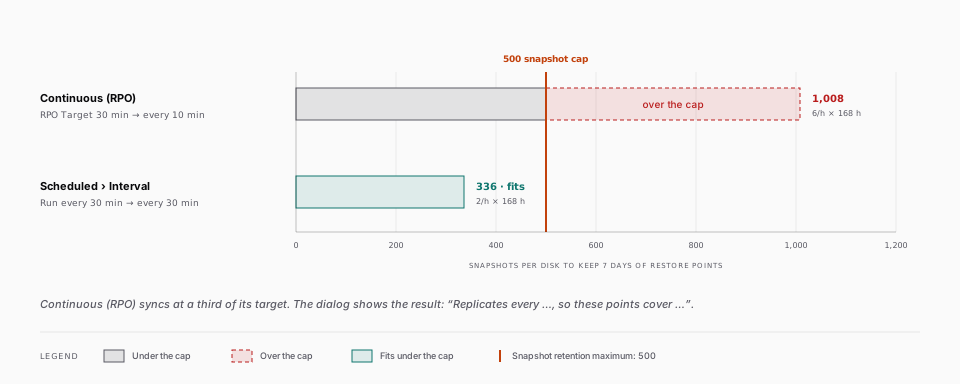
Both the create and the edit dialog spell out the result under the schedule, as "Replicates every ..., so these points cover ...": the cadence the chosen schedule really produces, and how far back the kept restore points reach at that cadence. Read it before saving rather than discovering the window in production.
Tag-Based Jobs and the Protected Set
A tag-based job resolves its tags against the source cluster before every sync, so the protected set follows the tags rather than a list frozen at creation. Both directions are recorded in the job's execution log:
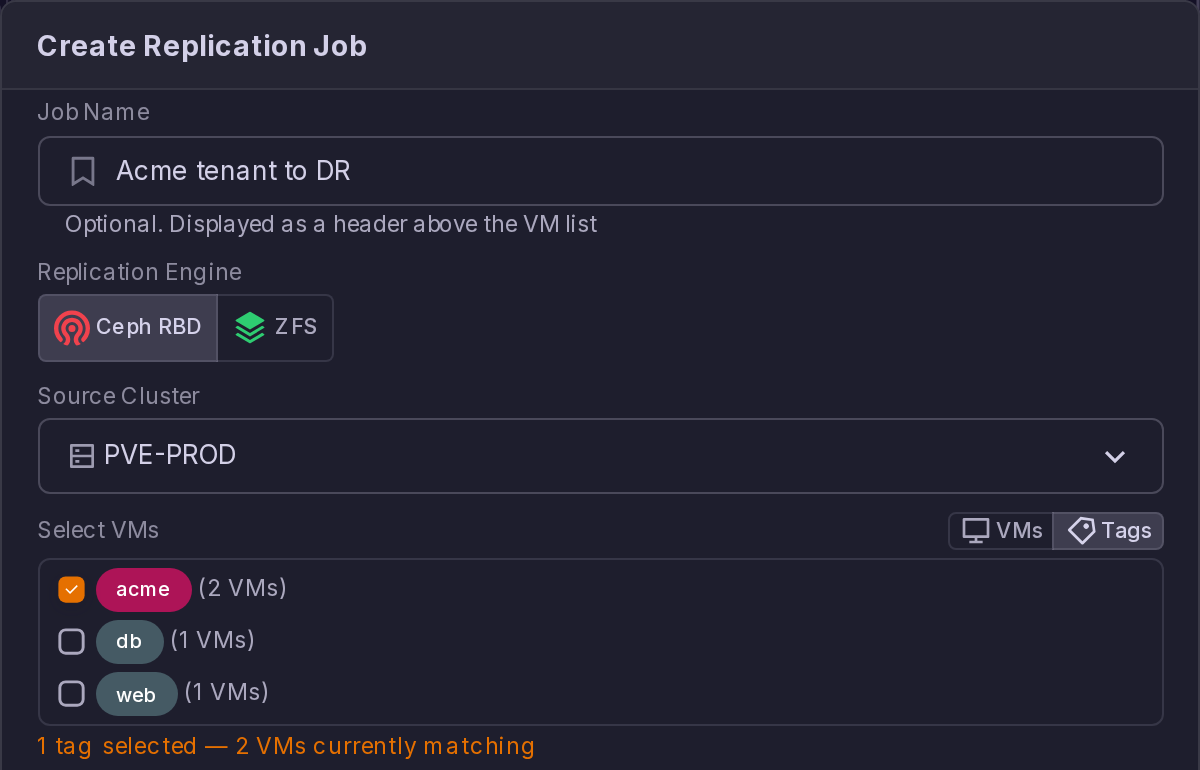
- A guest that has just gained one of the tags is added, and the log reads "Tag re-resolution added N VM(s) to protection".
- A guest that lost the tag, or that was deleted, is removed with a warning line: "Tag re-resolution removed N VM(s) from protection ... Existing replicas on the target are kept but will no longer be updated." Its per-VM row is dropped from the job so it stops being displayed as protected.
A removal is a protection gap, not housekeeping. The replica already on the DR cluster is left in place, so the plan still finds something to boot, but it is frozen at the last sync that included the guest. Check the tag before assuming the guest is still covered.
A Tag-Based Job That Matches Nothing
If a job's tags stop matching any guest, the job does not fail. It lands in a status of its own, No matching VMs, and:
- No failure notification is sent, and the retry cascade reserved for real errors is not entered.
- The next sync stays scheduled and the tags are resolved again at that point, so the job recovers on its own the moment a guest is tagged again.
- The status is shown wherever a job status appears: the status chip and the All statuses filter of this tab, the chip on the Emergency DR tab, and the Job Status Distribution bar of the Dashboard tab.
- RPO alerts keep firing. This is deliberate: a DR job that protects nothing has to keep nagging until somebody looks at it. See Replication and Ceph Alerts.
This status only appears on a job that has already been created. At creation time a tag selection that matches no guest is refused outright, with "no VMs found matching tags".
A Job With One VM in Error
One VM that cannot be replicated does not stop the job. The sync records the failure, moves on to the remaining VMs, and the job ends in a status of its own, Partially synced:
- The VMs that synced are protected as usual, and their per-VM row shows the time of the sync. The failed VMs keep a red Error row with the reason, and the job's message lists them: "1 of 6 VMs failed: VM 279: ...".
- The job stays on its schedule. The failed VMs are retried at the next sync, alongside the others, rather than through the retry cascade reserved for a job that fails as a whole. That cascade would re-sync every VM three times for one broken one, and would then leave the whole job parked in error.
- A failure notification is sent when a VM enters the error set, and after the automatic retry of a job that had failed as a whole, since that failure had not been reported yet. A VM that stays in error from one sync to the next is not notified again, whether the next run is scheduled or started with Sync Now.
- The failure alert is raised as a warning, with the same per-VM summary.
- The status is shown wherever a job status appears: the status chip and the All statuses filter of this tab, the chip on the Emergency DR tab, and the Job Status Distribution bar of the Dashboard tab. The job's card shows the per-VM summary as a warning.
A job whose VMs all fail is a whole-job failure: Error, three automatic retries, then manual intervention.
A replicated guest may carry Proxmox snapshots. Replication reads only the current section of the guest configuration, so a Proxmox snapshot does not interfere with it. The replica itself does not carry the guest's Proxmox snapshots: they live on the source images only.
Managing Replication Jobs
For each job, the following actions are available:
| Action | Description |
|---|---|
| Sync | Trigger an immediate replication sync |
| Pause | Temporarily suspend replication |
| Resume | Resume a paused replication job |
| Delete | Remove the replication job entirely |
Selecting a job opens its details dialog: the source and the target side by side, joined by a connector that carries a stream while a sync runs and a plain rule otherwise, one row per protected guest with the volume and duration of its last run, the bandwidth chart, and the tail of the execution log with the history of sync operations, timestamps and results. The per-guest table is paginated and is shown for a single-guest job too, where the figures of the last run appear nowhere else.
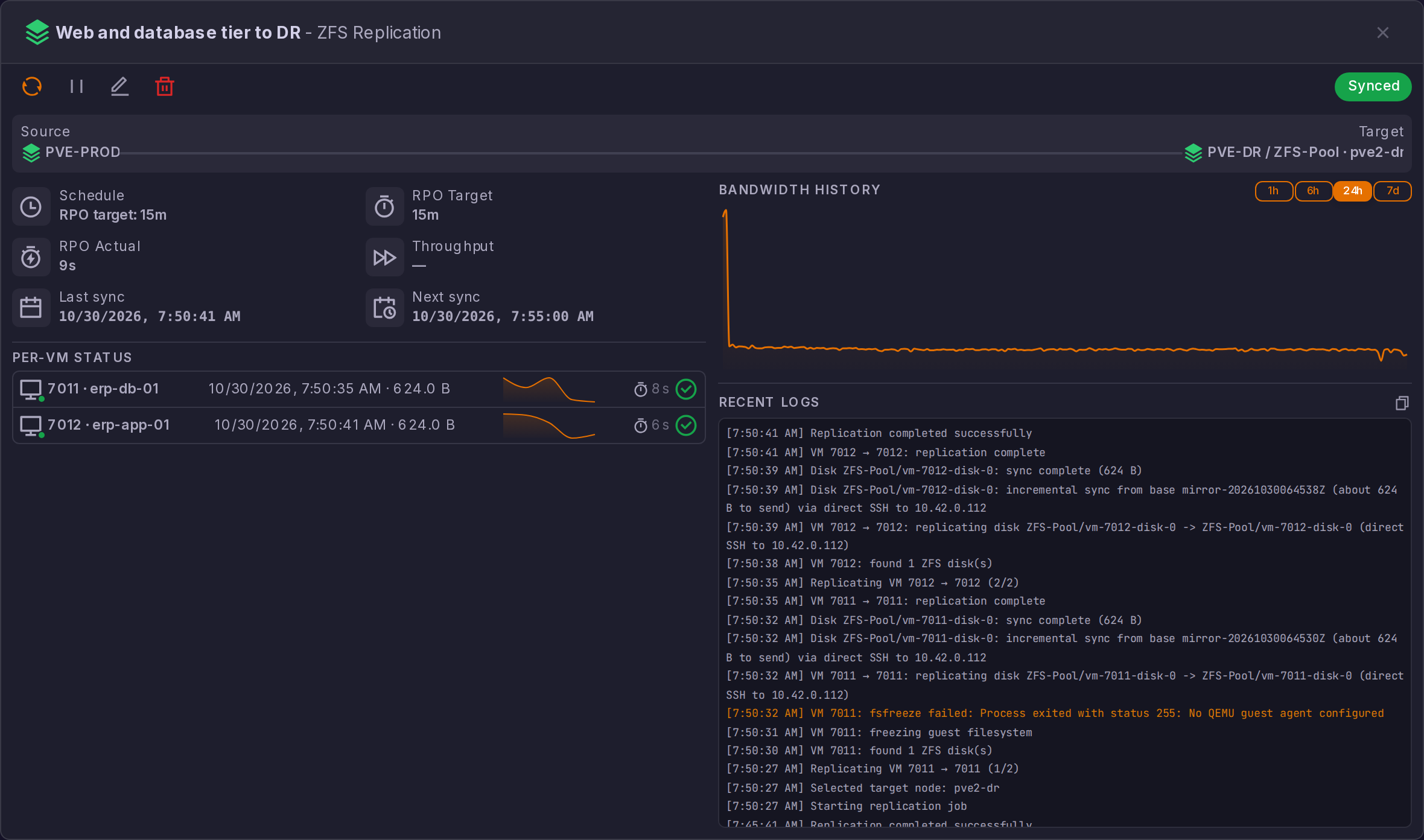
A Pause issued while a scheduled run is in progress holds once that run completes.
Why a pause holds even mid-run
A run records only what it measured, and never moves the status or the next occurrence of a job that has been paused or failed over in the meantime.
Run a manual sync after making significant changes to a protected VM to ensure the latest state is replicated before relying on it for recovery.
Naming the Replicas
A replica carries the source guest's name verbatim unless you say otherwise, so production and DR show up twice under the same name in the inventory and the replica is what gets started by mistake. Replica name, in Create Replication Job and in Edit replication job, takes an optional prefix and an optional suffix for the replicated guest's own name on the DR cluster: web01 becomes DR-web01, web01-DR or both. Leave both empty and the replica keeps the source name. A guest Proxmox never named keeps no name, since a prefix on its own is not a name.
The dialog previews the result on a guest you have actually selected, so you see the real name before saving.
Both fields accept letters, digits and hyphens only, up to 24 characters, and the composed name may not start or end on a hyphen.
Why the replica name is restricted
The restriction is not arbitrary: Proxmox stores a guest name as a DNS name, and ProxCenter writes the replica's configuration to the target node directly, so a name Proxmox would refuse is not caught on the way in and would surface later as a broken replica configuration. The rule guarantees the composed name is always one Proxmox accepts.
Unlike the VMID prefix, the replica name can be changed on a job that is already running. The replica's configuration is rewritten from the source at every sync, so a new prefix or suffix is applied on the next cycle, without re-copying a single disk.
Snapshot Retention
Each job keeps a rolling set of mirror snapshots on both sides, and how many it keeps is configurable in Create Replication Job and in Edit replication job, under Snapshot retention:
| Field | Meaning |
|---|---|
| Keep on source | Mirror snapshots kept per disk on the source cluster after each sync |
| Keep on target (DR) | Mirror snapshots kept per disk on the DR cluster after each sync |
The unit is a count of snapshots per disk, not a duration. Both sides default to 3, the minimum is 2 and the maximum is 500. Each field pairs a number box with a slider; the slider stops at 50, so type the value in the box if you want more than that.
Retention is one of the settings you can change after creation, along with the replica name, the schedule, the rate limit and the guest list. The clusters, the target pool, the engine and the VMID prefix are immutable: to change one of those, delete the job and recreate it. On a tag-based job the list of tags is immutable too, but that is about the list of tags, not about the guests: the protected set follows whatever carries those tags and is re-resolved at every sync, which is what makes tagging a guest enough to protect it.
Editing the guest list. A job in VMs mode can gain or lose guests without being recreated, from Edit replication job. The picker offers only the guests whose disks this job's engine can replicate, since one without them syncs nothing and the run merely logs that it skipped it. Five cases are refused, and said so rather than silently dropped: a guest whose replica is currently started, a guest a recovery plan lists, a guest another job already replicates, an empty list, and a job that is mid-sync or failed over. A guest that leaves keeps its replica and its mirror snapshots on the DR side, exactly as deleting a job does, so removing a guest from a job is not a way to clean up the DR cluster.
The restore points offered when you fail over are the mirror snapshots that still exist on the DR side, so Keep on target (DR) is what decides how far back in time you can recover. Raise it when you want more than the last few sync points, keeping in mind that every snapshot holds Ceph capacity.
Pruning runs at the end of each sync, per disk, and a floor of two snapshots is always re-applied so a common incremental base survives on both sides. It also removes at most ten snapshots per image per run, so lowering retention from a large value does not free the space at once: the backlog drains over the following syncs and the job log reports how many are still pending. During a failback the two roles are swapped, since the DR side is the one being replicated from.
What a Sync Transfers
The first sync of a disk carries its allocated data only, never its virtual size. A thin 500 GB disk that holds 96 MiB of data costs a 96 MiB transfer, and an empty disk added to a protected VM is replicated in seconds. The job log states both figures: "full sync (96.0 MB allocated of 500.0 GB)". Every later sync is incremental and carries the changes since the last common snapshot, logged as "incremental sync from base ... (up to 36.0 MB to send)", an upper bound counted in whole objects. The bytes credited to a sync, in the per-VM rows and in the volume figures of the Dashboard tab, are the bytes that actually crossed the wire, so a 20-second incremental on a 60 GB disk is not counted as 60 GB.
The live progress percentage and the rate limit of a job both rely on the pv tool being installed on the source cluster's nodes (apt install pv). Without it the sync runs the same, the progress bar simply stays at zero until the disk completes and the bytes credited are the estimate computed before the transfer rather than a measurement. That estimate is read from the image's object map and rounded up to whole objects, 4 MiB each by default, so it can overstate a sync made of many small scattered writes.
A first sync stopped halfway, by an orchestrator restart for instance, leaves a target image without any snapshot on the DR cluster. Site Recovery stamps every image it creates with the job that created it, so the next run recognises its own leftover, logs "target image left by an interrupted initial sync, replacing it", and starts over. Anything else that bears the destination name is treated as somebody's data and never removed: a disk of a DR-site VM that happens to use the same VMID, or an image that carries snapshots of its own, none of them shared with the source. The run refuses to touch it and says so, and you have to remove or rename that image, or its snapshots, on the DR cluster before the disk can be replicated.
Replication Network
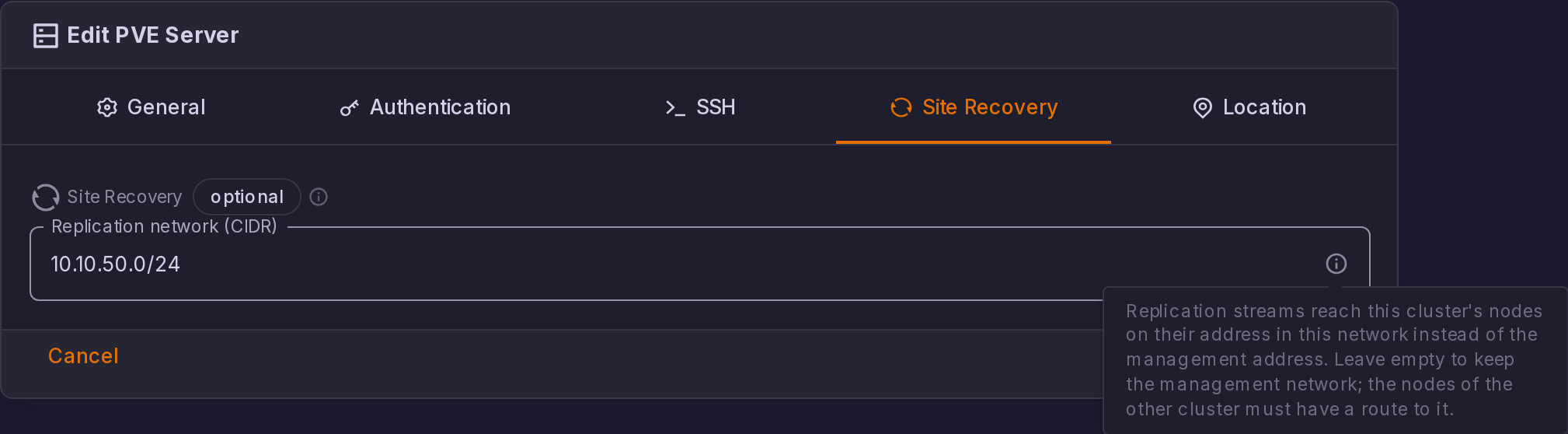
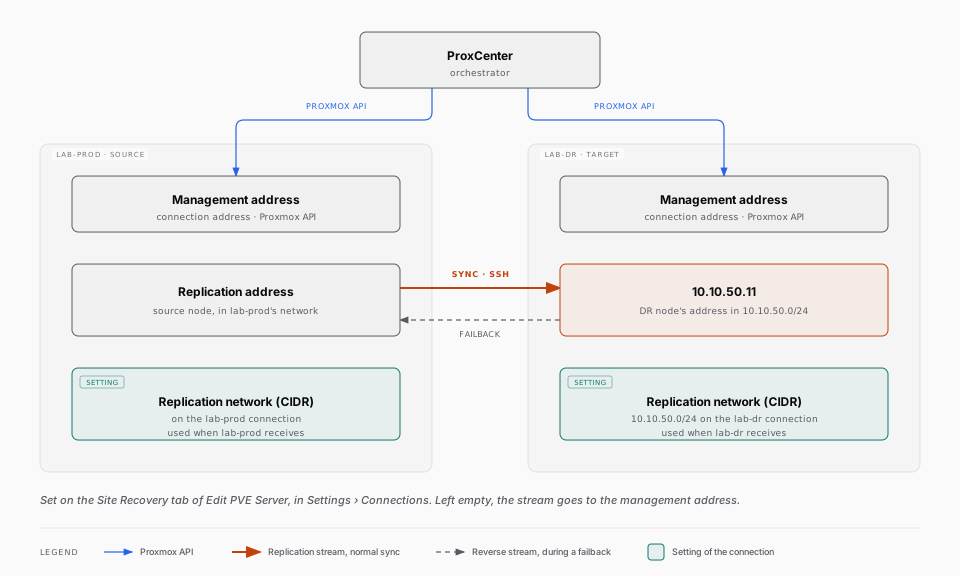
By default the replication stream travels to the management address of the target connection, the one ProxCenter uses for the Proxmox API. A connection can carry a Replication network instead, in Settings > Connections, in the SSH section of a Proxmox VE connection: a CIDR such as 10.10.50.0/24. When it is set, Site Recovery looks up the address of the DR node inside that network and sends the stream there, the way Proxmox itself uses its migration network. The job log records the choice: "Replication stream target: 10.10.50.11 (replication network 10.10.50.0/24)".
The setting belongs to the connection whose nodes receive the stream. For a normal sync that is the target connection; during a failback, the reverse replication flows towards the source connection, so it is that connection's replication network that applies. Set it on both connections when both directions should stay off the management network.
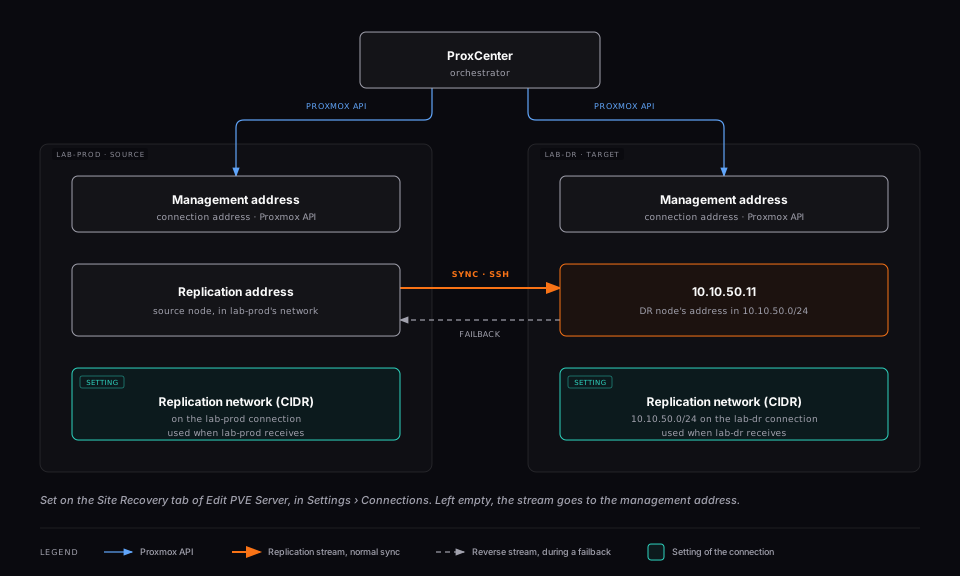
A few things to know before setting it:
- The nodes of the other cluster must have a route to that network, and the same SSH trust applies: the keys that let the source cluster reach the target cluster's management address let it reach the replication address too, since Proxmox authorises them cluster-wide.
- The SSH check that the job dialog runs before it lets you save tests the replication address, not the management one, so a missing route shows up before the job exists.
- The setting is checked at every sync. A node with no address in that network fails the run with an explicit message that lists the addresses it does carry, rather than falling back to the management network without telling you. A network that is not a valid CIDR is refused when you save the connection.
- The Proxmox API traffic is not affected: it keeps using the connection address.