Warm Migration Node Setup
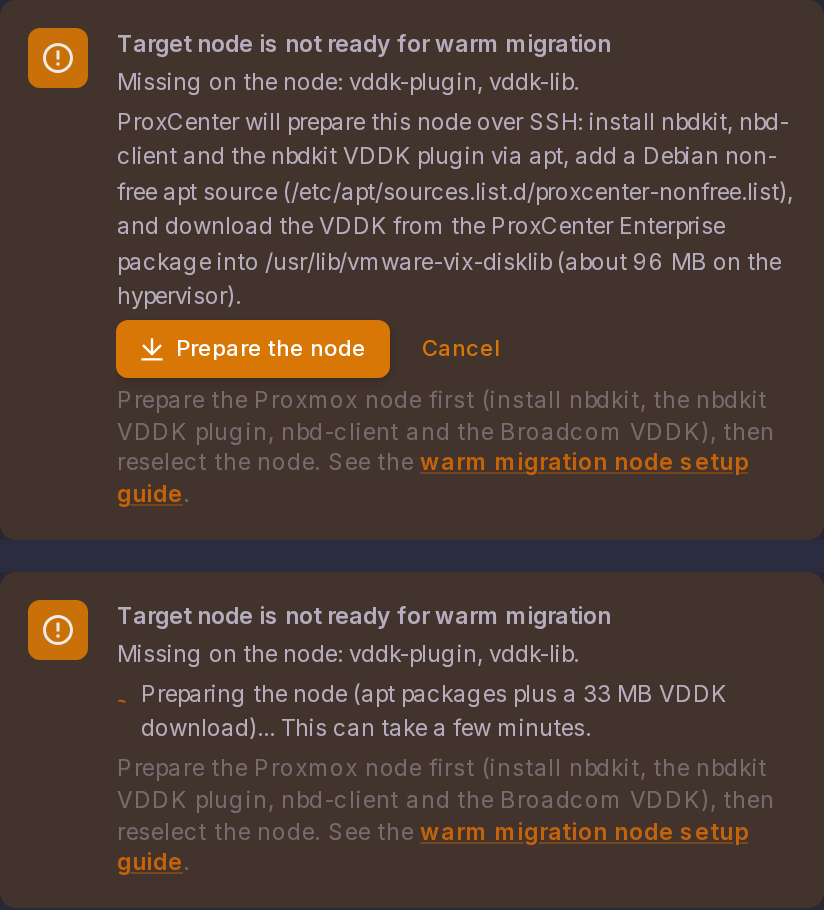
Before the first warm migration to a Proxmox node, that node needs the VDDK runtime. The dialog probes the selected node and shows "Target node is not ready for warm migration" with the list of missing components until all of them are present. This is a one-time setup per node, and ProxCenter can carry it out for you.
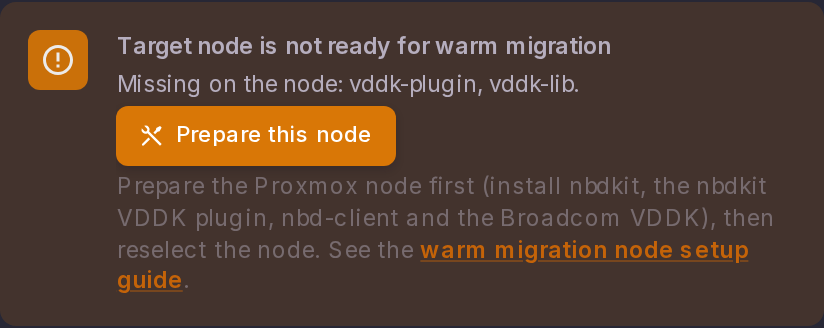
The warm path needs four components on the Proxmox node:
| Component | Source | Notes |
|---|---|---|
nbdkit | Debian main | Available on a stock Proxmox node. |
nbd-client | Debian main | Available on a stock Proxmox node. |
nbdkit-plugin-vddk | Debian contrib / non-free | Not enabled by default on Proxmox. Enable the repositories first. |
Broadcom VDDK (libvixDiskLib.so*) | Installed by ProxCenter | Proprietary Broadcom SDK. Broadcom withdrew its public download in August 2026, so ProxCenter ships it to Enterprise subscribers and installs it on the node. |
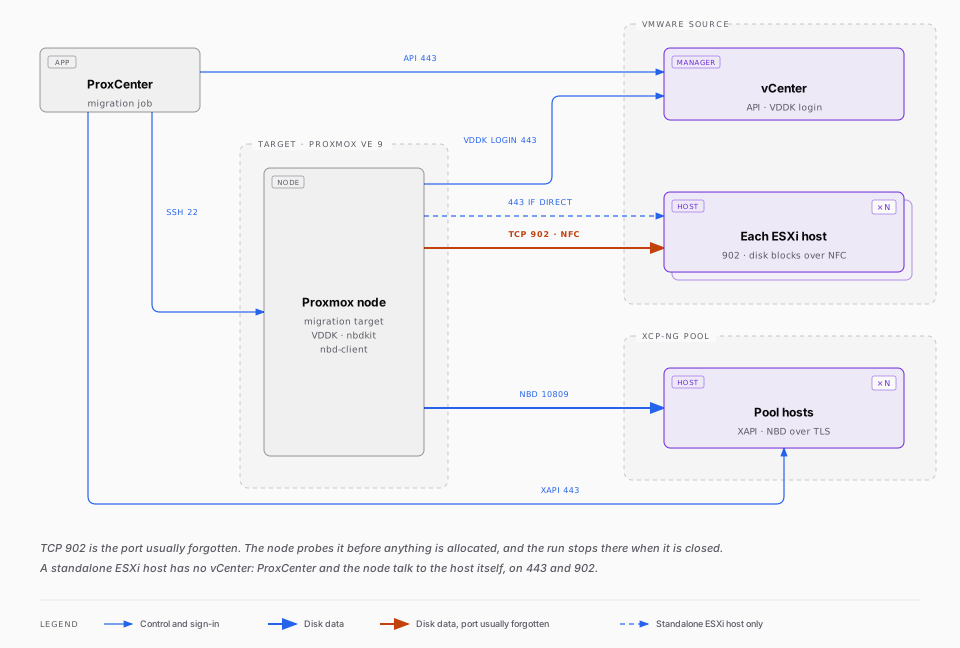
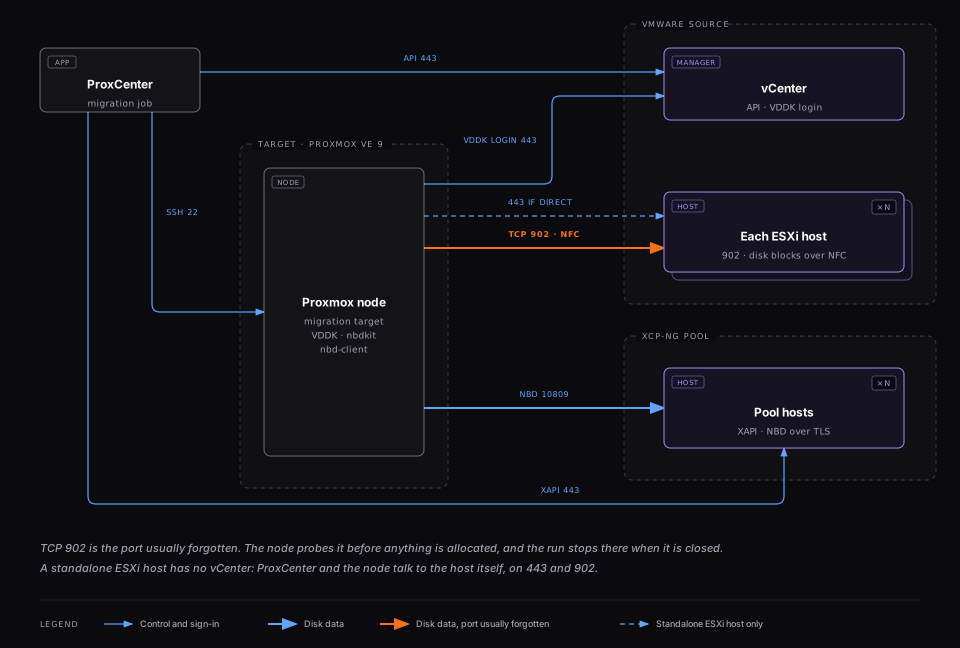
Warm migration copies disk data with the VMware VDDK in NBD transport mode, which uses the NFC (Network File Copy) protocol. The target Proxmox node must reach each source ESXi host on both TCP 443 (authentication and management) and TCP 902 (the NFC data channel that carries the disk blocks).
Port 443 alone is not enough. Authentication and the node readiness check will pass, the target disks will be allocated, and the migration will only fail later at the VixDiskLib_Open step against the ESXi host, when VDDK opens the NFC data channel. Open TCP 902 from the Proxmox node to every ESXi host before starting a warm migration.
The Source vSphere Version the Node Can Read
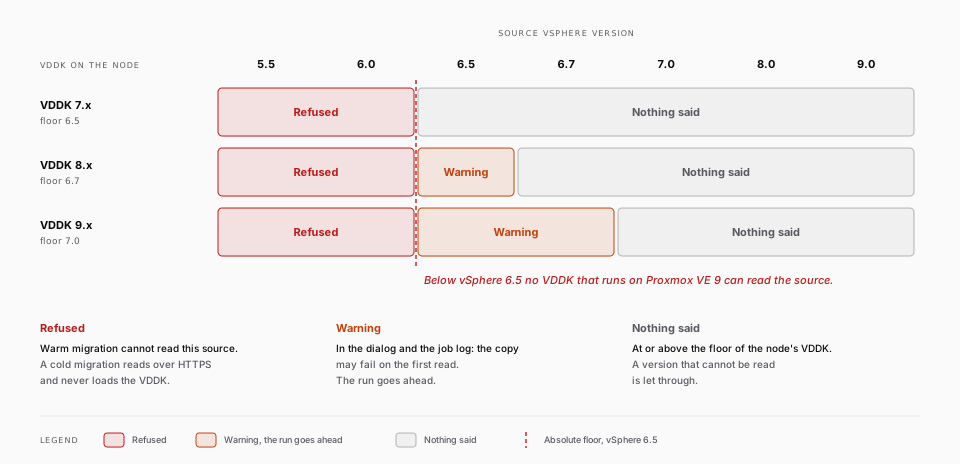
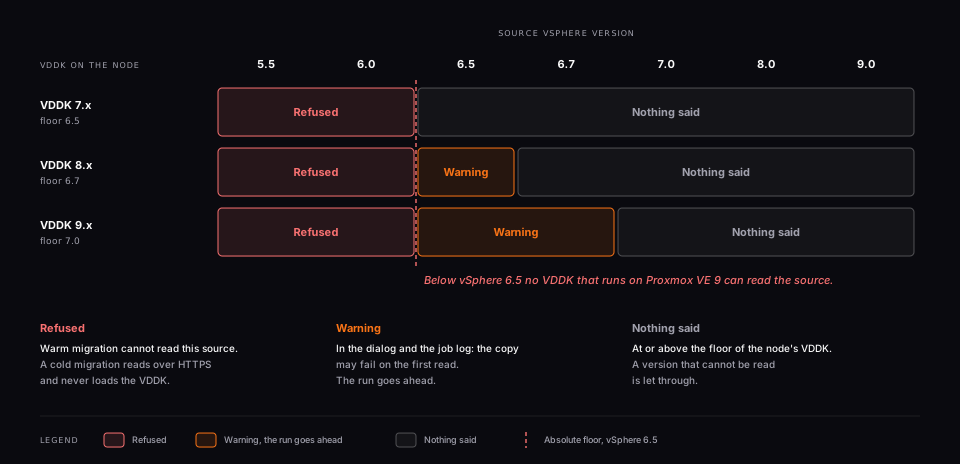
Broadcom supports each VDDK release against its own vSphere release and the two before it. The VDDK installed on the node therefore sets a floor on how old a source it can read, and the migrate dialog compares the two before the run starts.
| VDDK generation on the node | Oldest vSphere it is supported against |
|---|---|
| 7.x | vSphere 6.5 |
| 8.x | vSphere 6.7 |
| 9.x | vSphere 7.0 |
Below vSphere 6.5 the warm path is refused whatever the node carries. VDDK 6.5 is the last release Broadcom tested against ESXi 5.5 and it does not run on Debian 13, while the nbdkit of Proxmox VE 9 loads the libvixDiskLib.so.8 interface that only VDDK 8 and later provide: there is no combination that works.
Three outcomes, because they call for different answers:
| Source version | Result |
|---|---|
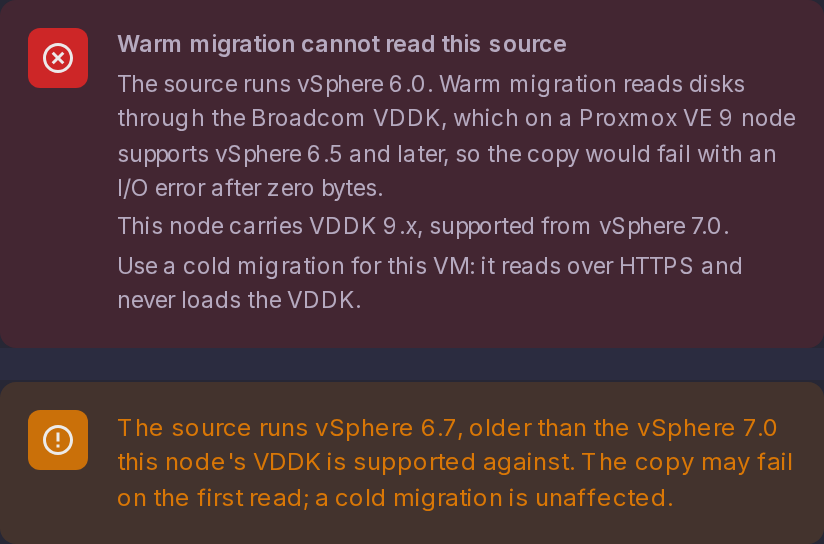
| Below vSphere 6.5 | Refused, under the heading "Warm migration cannot read this source": "The source runs vSphere X. Warm migration reads disks through the Broadcom VDDK, which on a Proxmox VE 9 node supports vSphere 6.5 and later, so the copy would fail with an I/O error after zero bytes.", followed by the generation the node carries |
| Between vSphere 6.5 and the node's own floor | A warning, in the dialog and in the job log: "The source runs vSphere X, older than the vSphere Y this node's VDDK is supported against. The copy may fail on the first read; a cold migration is unaffected." Broadcom does not support the pair, but the copy has a real chance of working, so the run goes ahead |
| At or above the node's floor | Nothing is said |
A cold migration is unaffected, which is what the refusal points at: it reads over HTTPS and never loads the VDDK, so it stays the answer for an old source. A source whose version cannot be read at all is let through: this check exists to explain a run that cannot work, never to become a second reason a reachable source is refused.
Why a version mismatch does not look like one, and how the node probe finds the VDDK generation
A VDDK too recent for its source opens the disk over SOAP on port 443 and reports the right capacity, so nbdkit comes up and nbd-client exports a device of the correct size. Only the NFC data channel on port 902 refuses, and the copy dies on dd: error reading '/dev/nbd0': Input/output error after zero bytes. Checking the version before the run saves the snapshot, the volume allocation and the thick zeroing that would come first.
The node probe resolves the libvixDiskLib.so.8 name that nbdkit actually loads down to the real library file, because both the unversioned libvixDiskLib.so symlink and the .so.8 compatibility symlink ProxCenter creates when it provisions a node point at that file whatever its generation, so neither says anything on its own.
A failed block apply names what failed. The apply step folds each dd's standard error into its output, so a warm copy that dies reports the reason it was given, Input/output error on the source side or No space left on device on the target, instead of the generic "command failed" wrapper of the transport underneath.
1. Let ProxCenter prepare the node
In the Migrate to Proxmox VE dialog, choose Warm Migration and select the target node. When the node is not ready, the readiness alert lists what is missing and offers Prepare the node. Confirm, and ProxCenter performs the whole preparation over SSH:
- installs
nbdkitandnbd-clientfrom the Debian repositories - adds
/etc/apt/sources.list.d/proxcenter-nonfree.listto enable the Debiancontribandnon-freecomponents, then installsnbdkit-plugin-vddk - downloads the VDDK into
/usr/lib/vmware-vix-disklib(about 96 MB on disk) and creates the library symlink the Proxmox nbdkit expects - loads the
nbdkernel module withmax_part=0, now and at every boot
It takes a couple of minutes, and the alert turns green when it is done. Running it again on a prepared node is harmless: every step is skipped when it is already satisfied, and nothing is re-downloaded.
The Proxmox node needs outbound HTTPS to ghcr.io for the download, the same requirement as the ProxCenter high-availability images. The registry credentials stay on the ProxCenter server, which hands the node a short-lived, download-only token; the Enterprise installer configures them, so there is nothing to type.
Two distinct causes hide the automated action.
The node runs Proxmox VE 8. The readiness alert then states the requirement instead of listing missing components: warm migration needs Proxmox VE 9, and such a node cannot be prepared at all, since Debian 12 does not package the nbdkit VDDK plugin.
The ProxCenter container does not hold the registry token. The action appears only when GHCR_TOKEN reaches the frontend container. An installation upgraded by pulling the images alone may not have it: the compose file passes its environment through an explicit environment: list, and an older compose file has no line for the token. The readiness alert then lists what the node is missing and links to the manual path below, with no automated action offered. Re-run the standard Enterprise install command to fix it, as described in Updating ProxCenter: it refreshes the compose file, writes the token, and preserves your secrets, your customised URLs and your data.
Why ProxCenter ships the VDDK
The VDDK is a proprietary Broadcom SDK. Broadcom withdrew its public download in August 2026: the developer-portal link returns a 404 and the kit is no longer listed in the public SDK catalogue, so a new customer cannot obtain it there. ProxCenter therefore ships the runtime to Enterprise subscribers, unmodified and with its Broadcom license notice, and installs it on the nodes that need it.
2. Or prepare the node by hand
Use this path when the Proxmox node has no outbound access to the registry, or when your policy requires you to place the runtime yourself. Run everything as root on each target node.
nbdkit and nbd-client, from the standard Debian repositories:
apt update
apt install nbdkit nbd-client
On a node without a Proxmox subscription, apt update exits with a 401 on the enterprise.proxmox.com repository. That is harmless here, since these packages come from the Debian repositories.
The nbdkit VDDK plugin, which lives in Debian non-free. Enable contrib and non-free in the node's apt sources, then install it:
. /etc/os-release
echo "deb http://deb.debian.org/debian ${VERSION_CODENAME} contrib non-free non-free-firmware" \
  > /etc/apt/sources.list.d/proxcenter-nonfree.list
apt update
apt install nbdkit-plugin-vddk
The Broadcom VDDK. It is not in any package repository, and since August 2026 it is no longer a public download. Obtain the Linux x86_64 archive from Broadcom through your own entitlement: a support case opened with the account that carries your vSphere subscription, your backup software vendor, or a copy your organisation already holds. Any VDDK 9.x release works, and Broadcom supports 9.x against vSphere 7.0.x and 8.0.x.
Then install the runtime libraries under /usr/lib/vmware-vix-disklib, so that libvixDiskLib.so* ends up in /usr/lib/vmware-vix-disklib/lib64/:
mkdir -p /usr/lib/vmware-vix-disklib
tar xzf VMware-vix-disklib-*.tar.gz -C /usr/lib/vmware-vix-disklib --strip-components=1
ldconfig
The nbdkit shipped with Proxmox loads the libvixDiskLib.so.8 library name. With VDDK 9.x, create the matching symlink (VDDK 8.0.x ships .so.8 directly and needs none):
cd /usr/lib/vmware-vix-disklib/lib64
ln -sf libvixDiskLib.so.9 libvixDiskLib.so.8
ldconfig
The strongest single check that the plugin and the library agree:
nbdkit vddk libdir=/usr/lib/vmware-vix-disklib --dump-plugin
It prints the plugin's version block with no error. A complaint about a missing libvixDiskLib.so.8 means the symlink is absent.
3. Prevent LVM from auto-activating guest volume groups
Relevant when migrating Linux guests that use LVM (most enterprise Linux templates). During a warm migration the guest disk is attached to the Proxmox node as an NBD device. When the node's LVM scans it, it auto-activates the guest's volume group on the host. ProxCenter releases those volumes itself before it detaches the device, so the migration completes and the device is freed, but two side effects remain for as long as the copy runs: the guest's logical volumes show up in lvs on the node, and a guest volume group that carries the same name as a host one (pve is common) makes Proxmox's own LVM operations fail with "Multiple VGs found with the same name".
Tell LVM to ignore NBD devices on the target node. The automated Prepare this node action does this for you. By hand, edit /etc/lvm/lvm.conf and add "r|/dev/nbd.*|" at the front of the global_filter list that Proxmox already ships in the devices { } section, keeping the existing entries:
global_filter = [ "r|/dev/nbd.*|", "r|/dev/zd.*|", "r|/dev/rbd.*|" ]
Check the result with lvmconfig --validate. No reboot is needed: LVM reads the file again on every device event. Do not replace the list, and never drop the zd and rbd entries, which keep LVM away from ZFS volumes and Ceph images.
Why the LVM filter is safe on Proxmox
Proxmox's own LVM and LVM-Thin storage lives on physical disks, never on /dev/nbd*, and warm migration reads the guest disk as a raw device rather than through LVM. The filter only stops LVM from touching the transient NBD devices used during migration.
4. Reselect the node
Back in the Migrate to Proxmox VE dialog, reselect the target node. The readiness check runs again and, once every component is detected, shows "Target node is ready for warm migration" and enables the migration button.

What the readiness check verifies
ProxCenter confirms nbdkit and nbd-client are on PATH, that nbdkit-vddk-plugin.so exists under /usr/lib or /usr/lib64, and that the VDDK library directory (/usr/lib/vmware-vix-disklib/lib64 by default) really carries the library. It follows the libvixDiskLib.so.8 name that nbdkit loads down to the file it resolves to, so it reports the VDDK generation rather than merely "something is installed", which is what makes the source version check possible.
Free space on the target storage
The warm preflight reads the live free space of the selected storage on the target node and compares it with the source disks plus the 10 % margin the cold engine already applies. The dialog shows both figures and blocks the launch rather than letting the copy run out of room halfway: "Not enough free space on STORAGE: X GB available, Y GB needed for the source disks plus a 10% margin. Free up space on it or pick another storage." A storage whose free space cannot be read is reported as such. The same rule is applied by the engine at planning time, so it also covers a node chosen automatically and a migration started straight from the API.
