Migration Troubleshooting
Errors a migration job can end with, what causes them and how to get past them.
A migration is stuck at the Import stage
Cause. The qm disk import command can take a long time for large disks.
Fix. Check the Task Center for the detailed log output.
The VM does not boot after migration
Cause. The boot order, the firmware or the controller of the boot disk does not match what the guest expects.
Fix. Verify the boot order is set correctly. For EFI VMs, ensure the OVMF BIOS is selected in the VM hardware settings. The boot disk of a Windows or UEFI guest is placed on sata0 automatically, see Guest hardware mapping. If a Windows guest still stops with INACCESSIBLE_BOOT_DEVICE, open Hardware and check which controller its boot disk is on: a guest created by an earlier migration keeps the controller it was created with. Move its boot disk to SATA by hand.
The network does not work after migration (interface renamed, no IP)
Cause. After migration a Linux guest often renames its network interface, for example from ens192 to enp6s18, and comes up without an IP. This is expected behavior, not a ProxCenter bug: systemd derives "predictable" interface names from the PCI address and card model, not from the MAC address. VMware presents a VMXNET3 card, which the guest names ens192. Proxmox has no VMXNET3, so ProxCenter converts the card to VirtIO on a q35 machine; the card lands at a different PCI address and the guest names it enp6s18. The guest's existing configuration still refers to the old name, so nothing binds to the new interface.
Fix. ProxCenter preserves the source NIC's MAC address on the migrated VM, so both fixes below are reliable and any DHCP reservation keyed on the MAC keeps working.
Option A, point the config at the new name (simplest for a single VM). Run ip -br link in the guest to find the new name, then update the network configuration:
- Debian / Ubuntu (ifupdown): edit
/etc/network/interfaces, replaceens192with the new name, thensystemctl restart networking. - Netplan: edit
/etc/netplan/*.yaml, replace the interface name, thennetplan apply. - RHEL / NetworkManager: rename
/etc/sysconfig/network-scripts/ifcfg-ens192to match the new device and setDEVICE=, or usenmcli con mod.
Option B, keep the old name (good for a fleet or scripted configs). Pin the name to the preserved MAC with a systemd link file. Create /etc/systemd/network/10-net-persist.link:
[Match]
MACAddress=aa:bb:cc:dd:ee:ff

[Link]
Name=ens192
Rebuild the initramfs (Debian / Ubuntu: update-initramfs -u, RHEL: dracut -f) and reboot. The interface comes back as ens192 and the original configuration applies unchanged.
A migrated VM keeps its own in-guest network configuration; ProxCenter does not push a static IP into the guest after migration. Set static addressing inside the guest using either option above.
For Windows guests, the direct ESXi and XCP-ng pipelines attach an e1000 card instead of a VirtIO one, because Windows has an inbox driver for it and a raw disk copy carries no VirtIO driver. The offline vCenter, Hyper-V and Nutanix route converts through virt-v2v, which installs the VirtIO drivers inside the guest; make sure the VirtIO driver media is available as described in Prerequisites.
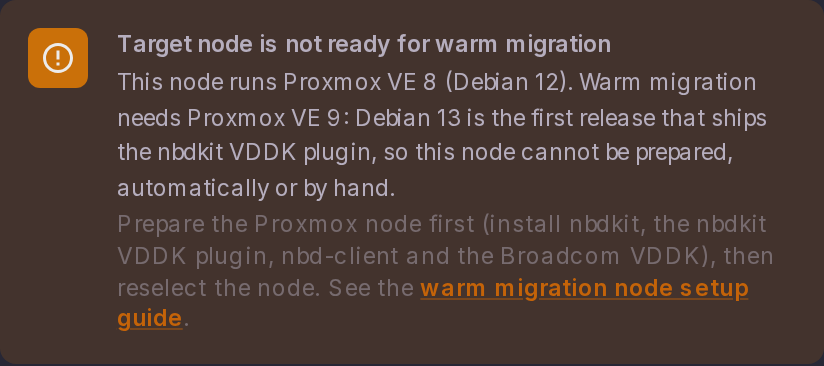
"Target node is not ready for warm migration"
Cause. The selected node is missing one or more warm-migration components (nbdkit, nbd-client, nbdkit-plugin-vddk, or the Broadcom VDDK), or runs Proxmox VE 8, which cannot carry them.
Fix. Prepare a Proxmox VE 9 node as described in Warm migration node setup, then reselect the node in the dialog. This requirement applies to warm migration only: offline migration installs its open-source tooling automatically and does not need the VDDK.
Warm migration fails with VixDiskLib_Open ... Unknown error returned by server
Cause. The target Proxmox node cannot reach the source ESXi host on TCP 902. Warm migration authenticates to vCenter over 443, but the VDDK reads the disk blocks directly from the ESXi host over the NFC protocol on TCP 902. When 902 is blocked, authentication, the node readiness check and target disk allocation all succeed, and the migration fails only at the full-copy step with VixDiskLib_Open naming the ESXi host rather than vCenter.
Fix. Open TCP 443 and 902 from the Proxmox node to every source ESXi host, as described in Warm migration node setup.
Warm migration fails with "nbd: nbd0 already in use" or a wedged NBD device
Cause. An NBD device stays pinned on the target node when the host auto-activates a Linux/LVM guest's volume group on it: nbd-client -d returns success without freeing it and rmmod nbd reports the module is in use (lsof shows nothing, because the holders are LVM / device-mapper, not open files). ProxCenter releases those holders itself before detaching the device, for warm migrations from VMware and XCP-ng and for the UEFI bootloader step of offline migrations.
Fix. A device that is still wedged is reclaimed without a reboot: list the holders with lsblk /dev/nbdN, remove them from the leaves up with dmsetup remove <name> (a thin volume before its pool), and the device frees itself once the last holder is gone (/sys/block/nbdN/pid empties). The LVM global_filter from step 3 of Warm migration node setup keeps the guest volume group from being activated in the first place.
Warm migration fails because a vSphere snapshot budget elapsed
Cause. A vSphere snapshot task did not finish within its budget. Snapshot tasks are followed to completion with budgets sized for large VMs, see vSphere snapshot waits, and the message names the operation, the object and the budget.
Fix. The vSphere task itself keeps running on the vCenter side, so check its state there before retrying.
A migration is still shown as running after ProxCenter was restarted
Cause. Migrations run inside the ProxCenter server process, so a restart, an upgrade or a crash interrupts them. On start-up ProxCenter fails those jobs with:
Migration interrupted: the ProxCenter server running this job stopped (restart, upgrade or crash). It did not complete and can be retried.
A job that belongs to another running instance is only swept once it has been silent for 12 hours, which is what keeps the sweep from killing a live migration on a peer replica in a high availability deployment.
Fix. The job ends up in the failed state, which the retry action accepts, so you can relaunch it.
A warm migration failed or was cancelled: is the copied target lost?
Cause. No. Cleanup keeps every target volume that already holds a completed copy pass and logs each volume it deliberately kept, so a full, bootable target survives a failure or a cancellation. Volumes that never received a finished copy are still freed, so a retry does not accumulate multi-terabyte leftovers. Cancelling a job whose target already holds a copy asks for confirmation, while a copy still in progress is discarded.
Fix. A copied volume stays on the storage: remove it by hand if you do not want it. Check the source VM's power, snapshot and CBT state after cancellation, especially during warm migration; see Source hypervisor privileges.
The Target Storage field is empty and Migrate stays disabled
Cause. The node did not answer the storage listing in time. The field says so, with the reason and a Retry link. A datacenter that declares many PBS targets needs 20 seconds or more to answer.
Fix. Raise PVE_SLOW_READ_TIMEOUT_MS above its 30 second default rather than the general Proxmox budget, see Timeouts and gates. If the message names a permission or a backend error instead of a timeout, fix that first: ProxCenter is repeating what Proxmox returned.