Write Tokens
A token that carries write scopes lets scripts, CI pipelines and infrastructure-as-code tooling change the fleet through ProxCenter. This page covers how write scopes differ from read scopes, who can mint such a token, how it is confined, the endpoints it opens, how to follow its tasks, examples, and the rights checked on sensitive actions. Writes are paced by their own quota, see Quotas.
Read vs write scopes
The *:read scopes listed in Scopes bundle read permissions only. Thirteen write scopes are separate: each lists its RBAC permission keys explicitly, none is granted until its domain is set to Write, and a scope is a domain barrier, so vms:power never lets a token delete or reconfigure a guest. Every write scope also carries the matching .view keys and connection.view, so a write token can read what it changes and poll its own tasks.
| Scope | Allows | Permission keys |
|---|---|---|
vms:power | Start, stop, shutdown, reboot, reset, suspend and resume a guest | vm.view, connection.view, vm.start, vm.stop, vm.restart, vm.suspend |
vms:write | Create, clone, convert to template, reconfigure, resize or move a disk, unlock, edit notes | vm.view, connection.view, vm.create, vm.clone, vm.config |
vms:snapshot | Create, roll back, edit and delete guest snapshots | vm.view, connection.view, vm.snapshot |
vms:migrate | Migrate a guest, including remote migration (check, prepare, run) | vm.view, connection.view, vm.migrate |
vms:delete | Destroy a guest | vm.view, connection.view, vm.delete |
backups:write | Backup jobs (create, edit, delete, run), one-off vzdump, PBS prune, sync, verify and tape jobs, snapshot verify | backup.view, connection.view, backup.job.view, backup.job.create, backup.job.edit, backup.job.delete, backup.job.run, vm.backup |
backups:restore | Restore a backup to a guest, and guest file restore | backup.view, connection.view, vm.backup, backup.restore |
backups:delete | Delete a PBS snapshot | backup.view, connection.view, backup.delete |
storage:write | Delete a volume, download an ISO or template from a URL, refresh appliance templates, attach or detach a PBS storage | storage.view, storage.content, storage.upload, storage.delete, connection.view, connection.manage, backup.view |
ha:write | HA resources, groups, affinity rules and auto-HA | node.view, connection.view, node.manage, connection.manage |
pools:write | Create, edit and delete resource pools | connection.view, connection.manage |
network:write | Node network interfaces, SDN apply, vDC VNets | node.view, connection.view, node.network, connection.manage, sdn.vnet.view, sdn.vnet.create, sdn.vnet.edit, sdn.vnet.delete |
firewall:write | Cluster, node and guest firewall: rules, aliases, groups, IP sets, NIC firewall, micro-segmentation | node.view, connection.view, node.manage |
vms:delete and backups:delete are the destructive scopes. They sit in red in the creation dialog, and what they remove cannot be brought back.
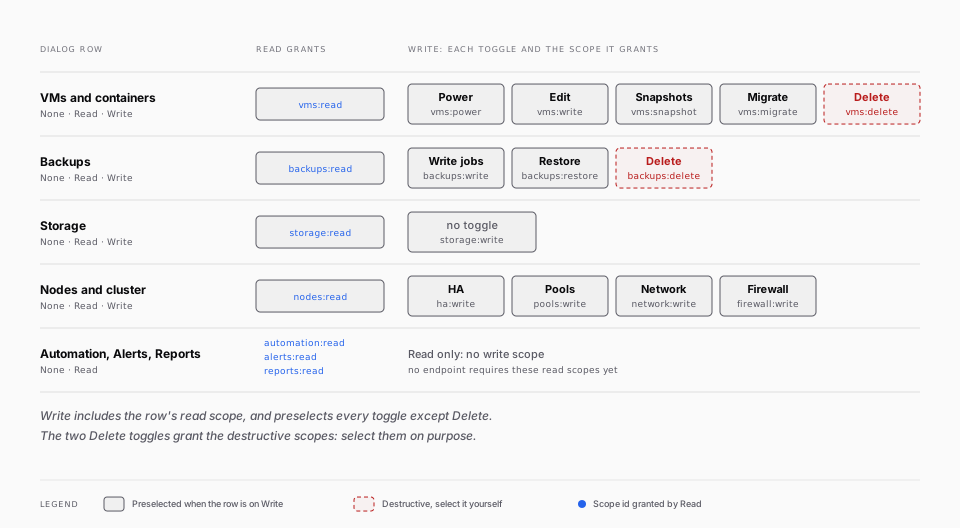
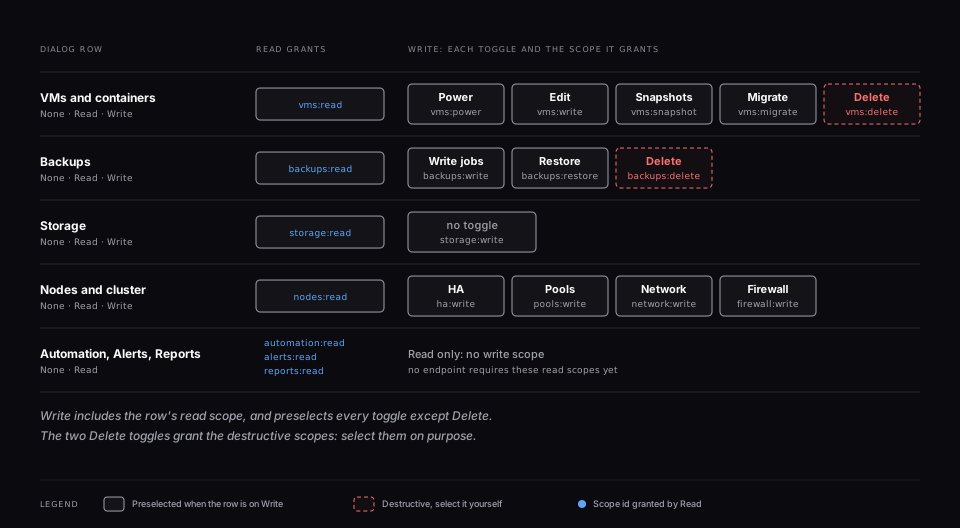
vm.config.nic.mac and vm.config.nic.vlan are in no scope. A vDC tenant token that changes a MAC address or a VLAN tag is refused, exactly like a tenant user without those rights. Console, upload by chunks, node reboot and shutdown, Ceph and connection management are not reachable by a token at all.
Who can mint a write token
A token never holds a right its creator does not hold. When you tick a write scope, the account creating the token must hold every permission of that scope, either tenant-wide or on each connection you chose (tenant-wide when the token covers all connections). A super_admin passes. Otherwise creation is refused with HTTP 403 naming the scope, and the dialog greys such scopes out.
Only tenant-wide grants and grants on the chosen connection count. A right held on a node, a VM, a tag, a pool or a storage does not, and neither does anything granted through a vDC: a token covers a whole connection, so it would be wider than its creator. A user whose rights live only inside a vDC therefore cannot mint a write token.
The check is repeated on every write, not only at creation. The creator must still exist, be enabled, still belong to the token's tenant and still hold the rights of the scope the endpoint needs. The verdict is cached for 60 seconds, so a token loses its write ability within 60 seconds when its creator is:
- demoted, or has the role removed
- disabled
- removed from the tenant
- deleted
The refused write answers HTTP 403 Token creator no longer holds this right. Reads keep working. This is the difference with the behaviour described in Offboarding a user: a token's reads outlive its creator, its writes do not. If a handler checks a permission beyond the scope's own keys, the creator must hold that one too.
A token whose creator was deleted can still read and can no longer write. Delete it, or mint a replacement from an account that holds the rights.
Confinement
Every write is checked before the handler runs, against the token's connection perimeter, and again by the usual RBAC checks inside the handler. The handler guards a session meets (quotas, VMID ranges, allowed drives, sensitive NIC keys, forced pools, migration restrictions for vDC tenants) apply to a token unchanged.
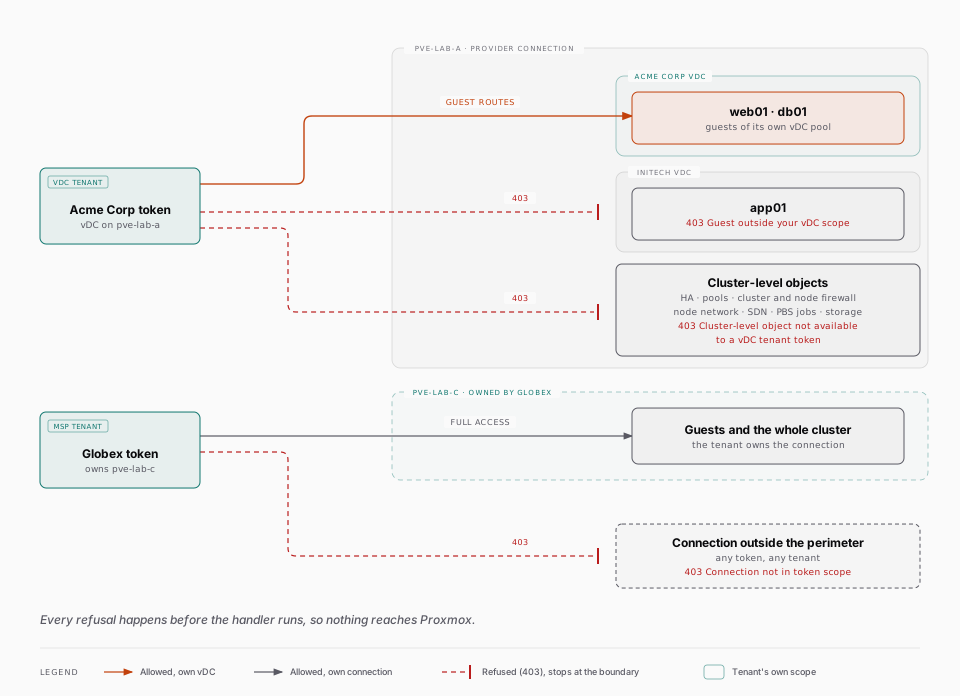
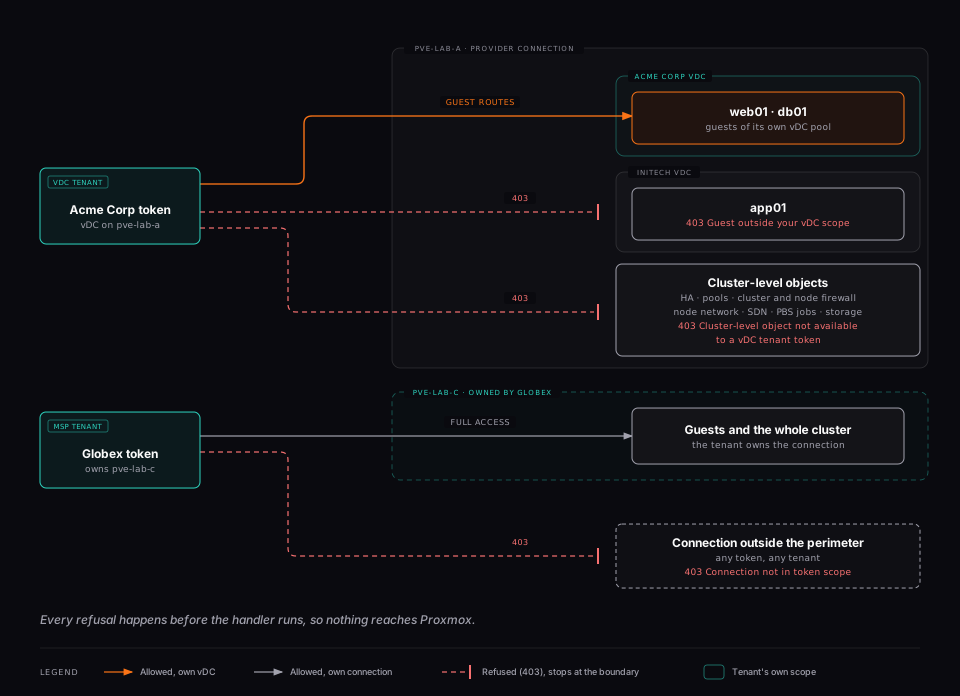
- Connection perimeter. A connection id is checked wherever it appears: in the path, in the request body, in nested body fields, and in the second connection of a call that names two (the target of a remote migration, the PBS source of a restore, the PBS of a storage attach). A connection outside the perimeter answers 403
Connection not in token scope, and nothing reaches Proxmox. A path parameter that is still percent-escaped after one decoding is refused with the generic 401. - vDC tenant tokens act only on their own guests. A token of a vDC tenant on a provider connection must name a guest that belongs to its vDC pools and nodes, for every route that targets an existing guest (power, config, clone, migrate, disks, snapshots, delete, notes, backups, restore, guest firewall, isolation). Anything else answers 403
Guest outside your vDC scope. - vDC tenant tokens never touch cluster-level objects of a connection they do not own: HA, pools, cluster and node firewall (and aliases, groups, IP sets), node network interfaces, SDN apply, PBS jobs, attaching or detaching a storage. Answer: 403
Cluster-level object not available to a vDC tenant token. A tenant that owns its connection keeps full access. download-url.POST .../storage/{storage}/download-urlmakes the Proxmox node fetch a URL, so it is refused to vDC tenant tokens (403Download URL not available to a vDC tenant token). Every other token may use it withhttpandhttpsURLs only.- Isolation. The micro-segmentation
isolateroute works on a vDC token's own guest, but withapply_base_sgsit would create cluster-level security groups, so that option is refused to vDC tenant tokens (403Cluster-level object not available to a vDC tenant token). The provider can pre-create the base groups.
Write endpoints
Each domain below is a set of routes in the OpenAPI document and in Settings > API reference, with its body schema, its response and the required scope on every operation. The reference states plainly that Try it really acts on your infrastructure.
| Domain | Scope | Routes (prefix /api/v1) |
|---|---|---|
| Guest lifecycle | vms:power, vms:write, vms:migrate, vms:delete | POST /connections/{id}/guests/{type}/{node} (create), POST .../{vmid}/{action}, PUT .../{vmid}/config, .../clone, .../template, .../disk/resize, .../disk/move, .../unlock, .../migrate, .../remote-migrate (with /check and /prepare), DELETE .../{vmid}, PUT /guests/{vmid}/notes |
| Snapshots | vms:snapshot | POST and DELETE /guests/{vmid}/snapshots, POST (rollback) and PUT /guests/{vmid}/snapshots/{snapname} |
| Backups | backups:write, backups:restore, backups:delete | /connections/{id}/backup-jobs (and /{jobId}), .../nodes/{node}/vzdump, .../nodes/{node}/restore, /pbs/{id}/jobs/{kind} (and /{jobId}, /{jobId}/run), /pbs/{id}/backups/{backupId} (and /verify), /guest-file-restore/* |
| Storage | storage:write | DELETE .../storage/{storage}/content/{volid}, POST .../storage/{storage}/download-url, POST .../aplinfo, POST and DELETE /connections/{id}/storage |
| HA | ha:write | /connections/{id}/ha/{sid}, ha/groups, ha/affinity-rules, ha/auto-ha (and /sync) |
| Pools | pools:write | POST, PUT, DELETE /connections/{id}/pools |
| Network | network:write | /connections/{id}/nodes/{node}/network (and /{iface}), POST /connections/{id}/sdn/apply, /vdcs/{id}/vnets (and /{pveName}) |
| Firewall | firewall:write | /firewall/aliases, cluster, groups, ipsets, nodes, vms and microseg, each followed by the connection id |
| Tasks | any write scope | GET /tasks/{connectionId}/{node}/{upid} |
A guest in a snapshot or notes route is addressed by its composite key connId:type:node:vmid, URL-encoded.
Because the write routes are opened, the GET endpoints that sit next to them (for example the guest config, the HA groups or the backup-job list) answer to a read token as well as to a write token.
Tasks
Most writes are asynchronous. The answer carries the Proxmox UPID of the task, and a 200 means the task was accepted, not that it succeeded. Poll
GET /api/v1/tasks/{connectionId}/{node}/{upid}
until status is stopped, then read exitstatus (OK on success) and failureReason. Any write scope opens this route, the connection must be in the perimeter, and the UPID must be URL-encoded because it contains colons.
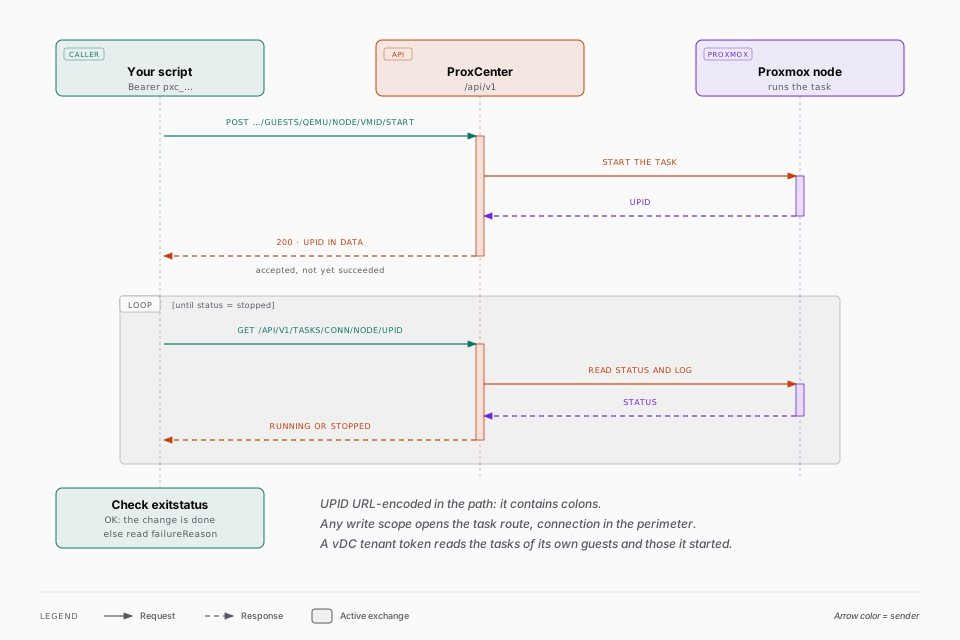
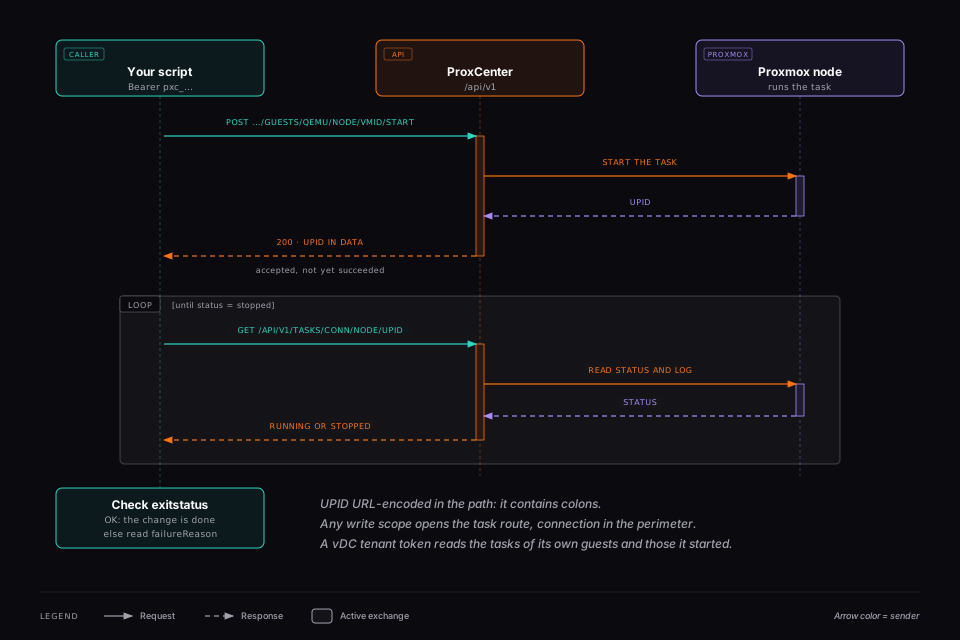
A vDC tenant token can poll the tasks of its own guests, and the tasks it started itself (so it can read the outcome of a delete, or of a create that failed). The UPID must name the node in the path. A task outside its scope answers 403 Task outside your vDC scope.
Examples
Placeholders only. Set once:
BASE=https://proxcenter.example.com
TOKEN=pxc_REPLACE_WITH_YOUR_TOKEN
CONN=CONNECTION_ID
NODE=NODE_NAME
Start a VM (vms:power):
curl -fsS -X POST \
  -H "Authorization: Bearer $TOKEN" \
  "$BASE/api/v1/connections/$CONN/guests/qemu/$NODE/VMID/start"
Create a snapshot (vms:snapshot). The guest is CONN:qemu:NODE:VMID, with the colons encoded:
curl -fsS -X POST \
  -H "Authorization: Bearer $TOKEN" \
  -H 'Content-Type: application/json' \
  -d '{"name": "before-upgrade", "description": "Taken by CI", "vmstate": false}' \
  "$BASE/api/v1/guests/$CONN%3Aqemu%3A$NODE%3AVMID/snapshots"
Poll the task with the UPID returned by either call (any write scope):
curl -fsS \
  -H "Authorization: Bearer $TOKEN" \
  "$BASE/api/v1/tasks/$CONN/$NODE/UPID_URL_ENCODED"
Delete a VM and remove it from backup jobs (vms:delete). The guest must be stopped and unlocked:
curl -fsS -X DELETE \
  -H "Authorization: Bearer $TOKEN" \
  "$BASE/api/v1/connections/$CONN/guests/qemu/$NODE/VMID?purge=1"
destroy-unreferenced-disks=1 can be added to the same call to remove disks the guest config no longer references.
Rights checked on sensitive actions
These checks apply to tokens and sessions alike. A few of them are easy to miss on a custom role:
- Deleting a PBS snapshot needs
backup.delete. - Verifying a PBS snapshot needs
vm.backupon the PBS connection. - Restoring a backup needs
backup.restore, andvm.deleteas well when the restore overwrites an existing guest. A role withoutvm.delete, such as Operator, cannot restore over an existing guest. - A remote migration also checks
vm.migrateon the target connection. - Changing or applying the Auto-HA settings of a cluster needs
node.manageon the connection; a right on a single node does not suffice, and the card is read only in that case. - Download from URL is refused to vDC tenants, who upload files instead: the Proxmox node fetches the URL itself, so ProxCenter cannot vet where it really goes.
- A tenant user listing the VNets of another tenant's vDC gets the same 404 as for a vDC that does not exist.
- Reading a task status is bound to the task's connection, with a fallback on the right over the guest or the node the task runs on, so a user scoped to a few VMs still follows their own tasks. A task covering several guests (a backup job run) needs a right over the whole connection.
Read tokens also reach the GET endpoints of the write routes, as described under Write endpoints.