vDC Policies and ISO Library
The provider-side policies that shape what a tenant vDC can consume: storage tiers with their QoS caps, the compute policy, and the ISO library a tenant can mount.
Storage Policies and QoS Tiers
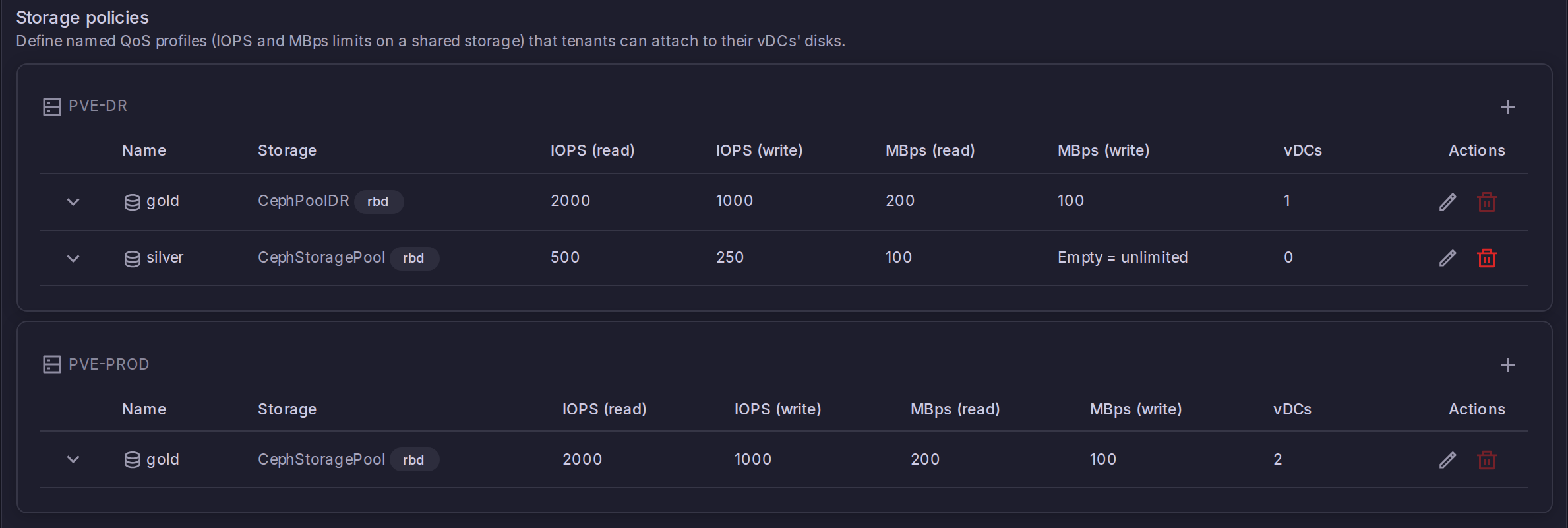
A storage policy is a named QoS profile the provider declares on one storage of one cluster. It carries up to four caps -- read IOPS, write IOPS, read MBps, write MBps -- and a vDC attaches it with a quota of its own, which turns the storage into a sellable tier. Policies are managed from Settings > Virtual Datacenters > Storage policies, with one card per Proxmox connection. (Enterprise)
Declaring a policy
Open the card of the cluster that owns the storage and use the + button:
- Name, unique on that cluster, up to 64 characters.
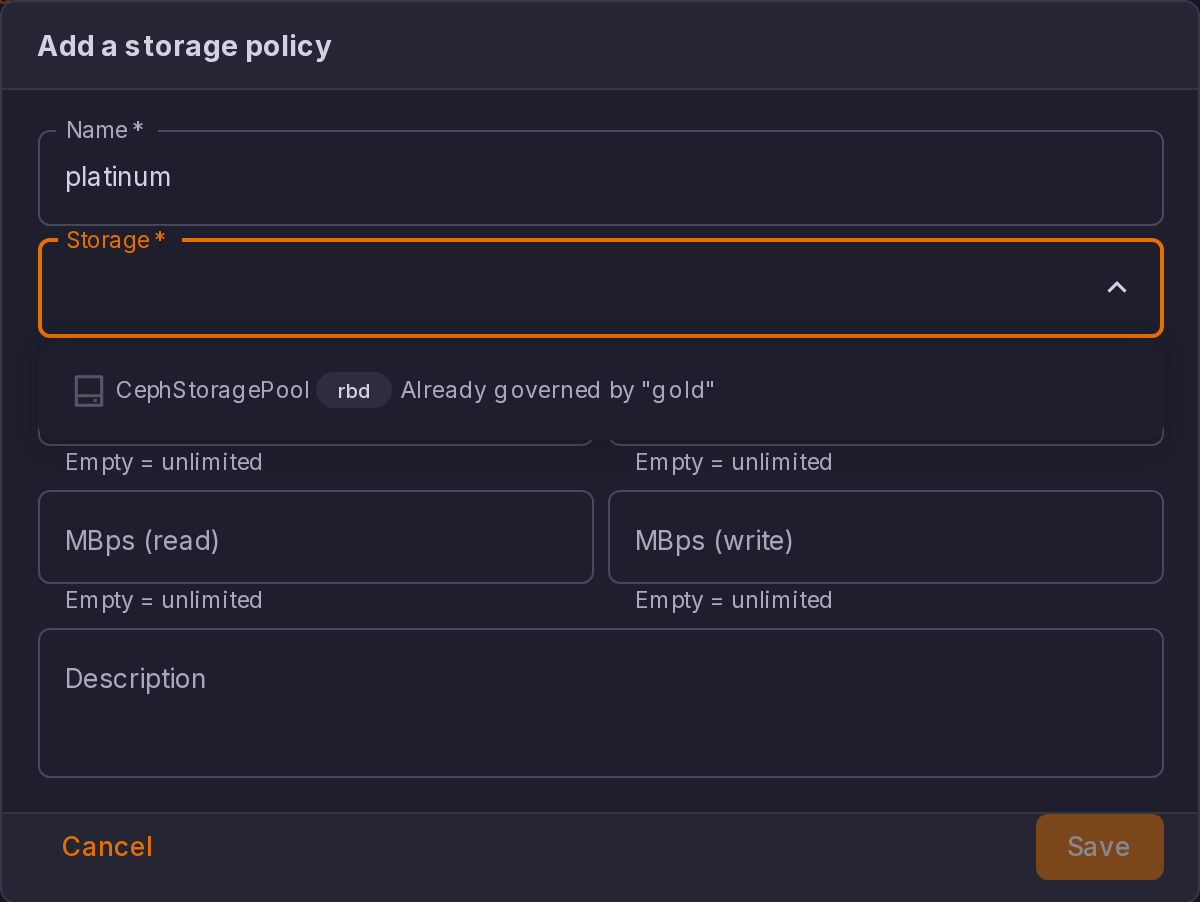
- Storage. The picker only offers storages that can back a vDC disk: shared, enabled, and advertising
imagesorrootdircontent. The choice is re-validated against the cluster when you save. - IOPS (read), IOPS (write), MBps (read), MBps (write). Each is a positive integer, and an empty field means no limit on that axis. The table renders an empty cap as Unlimited.
- An optional Description.
| Rule | Detail |
|---|---|
| One policy per storage | A storage carries at most one policy per cluster, because the tier quota is metered per storage. The picker greys out a storage that is already governed and names the policy holding it |
| Shared storage only | A local storage is refused: a guest that lands on one cannot live-migrate, which breaks the placement promise of a vDC |
| Provider-pool clusters only | A cluster handed over whole to an MSP tenant cannot carry a storage policy. Declare policies on the clusters you slice through vDCs |
| Storage frozen once assigned | While at least one vDC has the policy attached, the Storage field is locked. Changing it would silently drop the old storage out of every assigned vDC's allow-list. Cap edits stay available |
| Delete blocked while assigned | Deleting a policy that a vDC still uses is refused, and the delete button carries the number of vDCs holding it |
The Storage policies view lists a card for every Proxmox connection, including clusters owned by an MSP tenant. Those clusters cannot carry a policy, and a create attempted there fails with a server error rather than a clear message. Only declare policies on clusters you slice through vDCs.
Attaching a policy to a vDC
In the vDC dialog, the Storage policies section lists the attachments. Attach a policy adds a row: pick the policy, then optionally a Quota (GB) for that tier. Leave the quota empty and the tier only stamps its caps, with consumption still counted by the vDC's global storage quota.
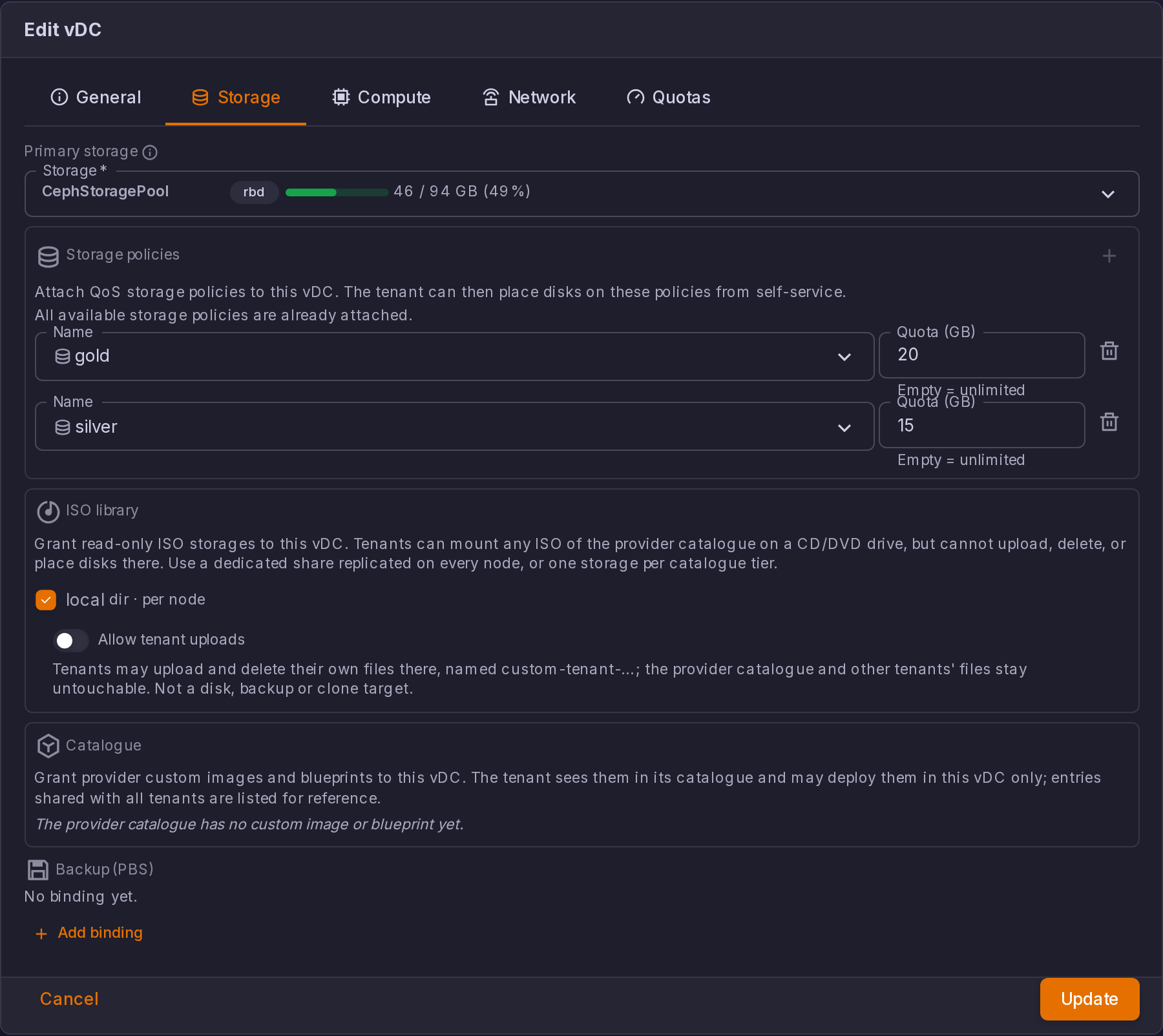
Detaching is guarded: if the vDC still holds volumes on that policy's storage, the save is refused and the message names the VMIDs concerned. When the cluster cannot be reached, the check is skipped rather than blocking the edit, so an unreachable cluster never locks the provider out of the vDC form.
The vDC list carries a Storage policies column showing, per attachment, the policy name, its storage, and its quota.
What the caps apply to
Caps are stamped on the disk line itself, so Proxmox enforces them. They are written on every path a vDC tenant uses to put a VM disk on a governed storage:
| Operation | Caps stamped |
|---|---|
| Creating a VM | Yes, on save |
| Adding, editing, or importing a disk from the guest Hardware tab | Yes, on save. An import-from disk is stamped like any other |
| Deploying from the templates wizard | Yes, on the boot disk |
| Cloning a guest | Yes, once the clone task finishes |
| Restoring a backup | Yes, once the restore task finishes |
| Rolling back a snapshot | Yes, once the rollback task finishes |
| Moving a disk to another storage | Yes, with the target storage's caps, once the move finishes |
Stamping applies to QEMU VM data disks (scsiN, virtioN, ideN, sataN) belonging to a vDC (IaaS) tenant. Containers are not stamped: an LXC mount point uses a different config shape and carries no QoS options. EFI and TPM state disks are validated against the vDC's allowed storages but take no caps. Guests of the provider tenant and of MSP tenants are never touched.
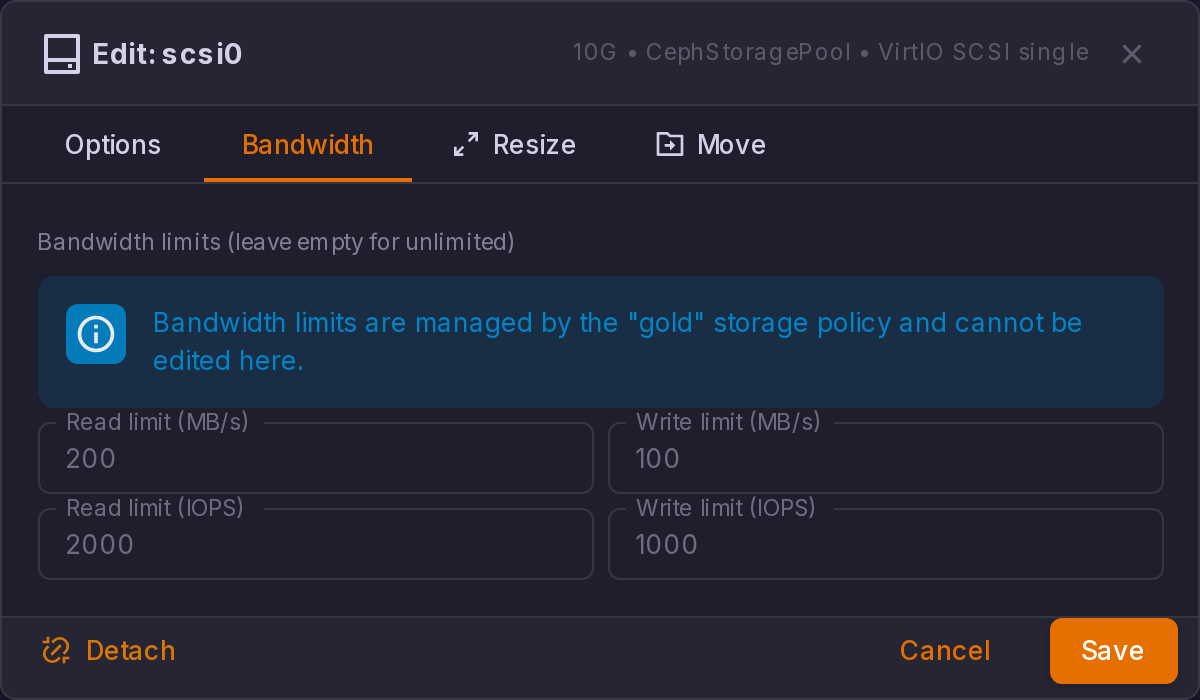
Any bandwidth or IOPS option the tenant sets by hand is stripped and replaced by the policy's values on every save, so a tenant cannot buy a slow tier and raise its own ceiling. The Edit disk dialog reflects that: on a governed storage a line names the policy that owns the caps, and the four bandwidth fields below it are read-only, prefilled with the policy's values.
The tier quota and how usage is measured
Per-tier usage is read from the storage's own content listing, restricted to the guests in the vDC's Proxmox pool. That is what PVE actually allocated, not what the tenant declared, so an import-from allocation costs its real source size rather than the token size typed in the form.
The tier quota is enforced server-side before the request reaches Proxmox on: creating a guest, adding a disk, resizing a disk, moving a disk onto the tier, cloning, and deploying from the templates wizard. A restore is not metered against the quota, although its disks are still stamped with the tier caps.
Tenants see the tier two ways:
- My Datacenter adds a Storage tiers block under the quota donuts, with one bar per attached policy that carries a quota. The bar turns red past 90 %, and a tier already over its quota is flagged with a warning icon next to the used / quota figures.
- The templates deploy wizard adds a fifth donut for the tier of the selected storage and blocks Next while the projected disk would overflow it, instead of letting the deployment fail on its last step.
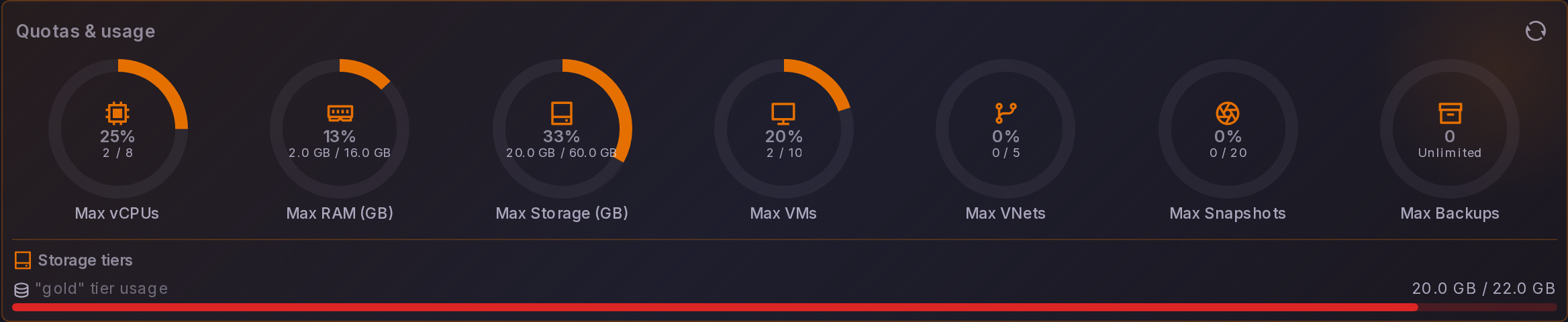
The Create VM and Create Container dialogs show the four global quota donuts but not the tier axis. A request that would overflow a tier is still refused by the server, with the policy name and the used / quota figures in the error.
Bringing existing disks under a policy
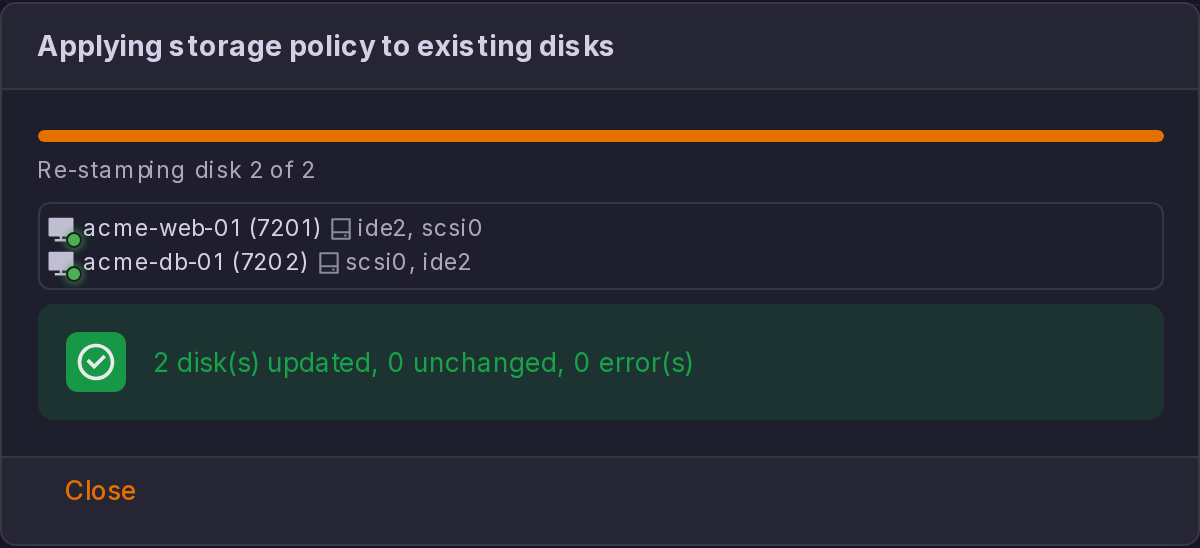
Saving a policy after changing one of the four caps re-stamps every existing disk on that storage, across every VM of every vDC the policy is attached to. The dialog switches to a progress view for the duration: a live counter of VMs processed, one line per VM with the disk keys that changed, and a closing summary of disks updated, unchanged, and in error. Close stays disabled until the run ends.
Two limits are worth knowing before you plan a migration onto tiers:
- The run is triggered by a cap change only. Creating a policy, attaching an existing one to a new vDC, or saving a rename does not visit any disk.
- Only QEMU VMs in the pools of the vDCs the policy is attached to are visited. A policy attached to no vDC has nothing to re-stamp.
Governed disks and drift
Expanding a policy row lists every VM that currently holds a disk on that storage, with one chip per disk in the form scsi1 · 100/100 · 10/10M: the disk key, then read/write IOPS, then read/write MBps. A missing cap renders as a dash.
A chip in warning colour means the disk has drifted: its live caps no longer match the policy. That happens when a cap was changed while a VM could not be reached, or when someone edited the drive line straight in Proxmox. Drift is cleared by the next re-stamp run, which only a cap change triggers. The list is fetched when the row is first expanded and refreshed after a run, and a VM whose config could not be read is shown as an error rather than dropped.

Compute Policy
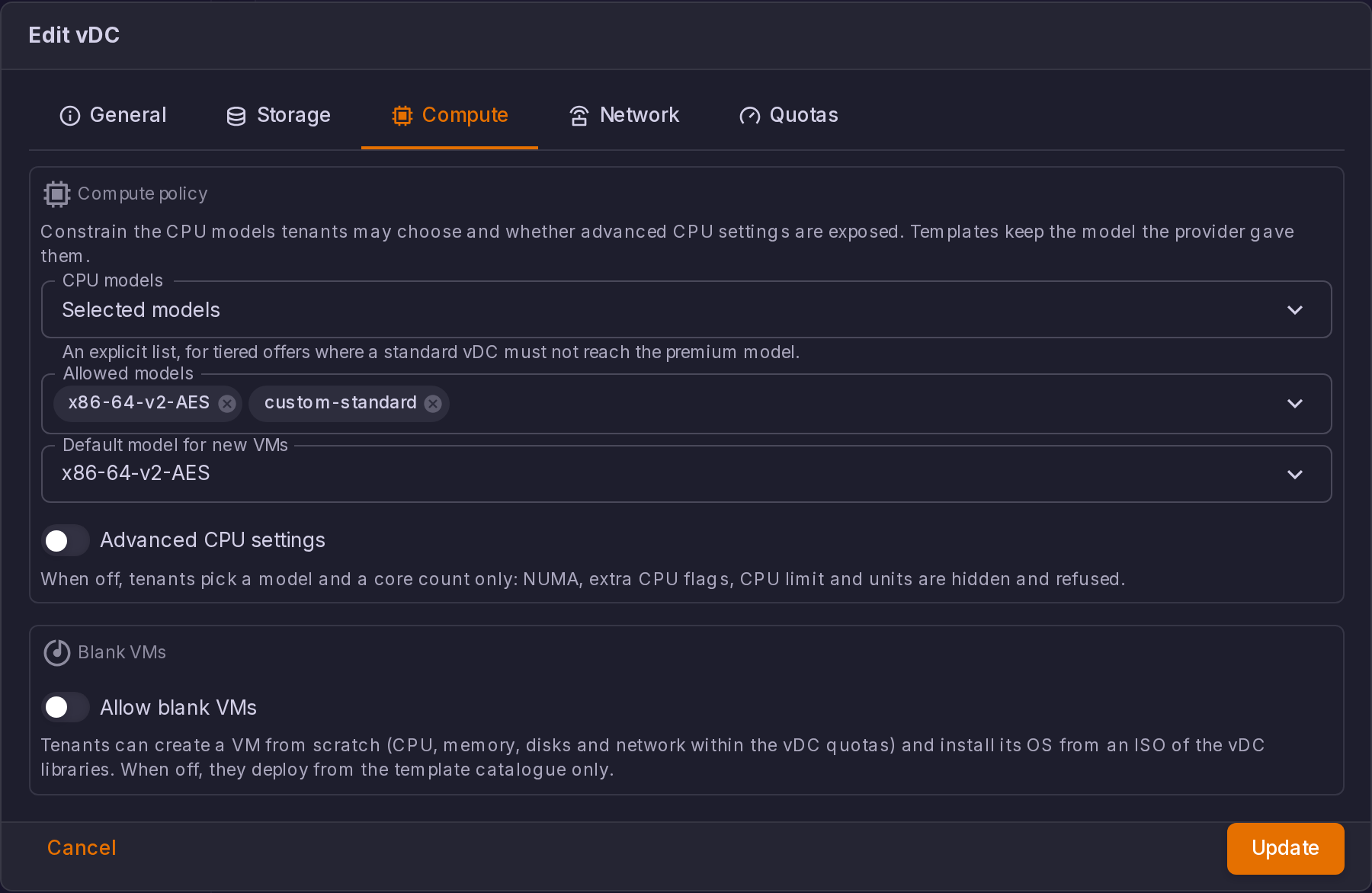
A vDC can constrain the CPU models its tenant may pick, on the Compute tab of the vDC dialog, under Compute policy: "Constrain the CPU models tenants may choose and whether advanced CPU settings are exposed. Templates keep the model the provider gave them." (Enterprise)
CPU models takes one of three values:
| Mode | What it offers the tenant |
|---|---|
| Unrestricted | Every built-in and custom model. This is the default |
| Custom models only | Only the models defined in the cluster's cpu-models.conf. A model added there later appears without any change to the vDC. The field says how many the cluster currently defines |
| Selected models | An explicit list, picked in Allowed models. This is the mode for tiered offers, where a standard vDC must not reach the premium model |
Two settings sit beside it:
- Default model for new VMs, which the server injects when a tenant creates a guest without naming one. Left on Automatic, the first allowed model is used. It exists because Proxmox's own default is
kvm64, which is rarely inside a curated list. - Advanced CPU settings, on by default. Switched off, "tenants pick a model and a core count only: NUMA, extra CPU flags, CPU limit and units are hidden and refused."
What the policy applies to
The policy is enforced server-side and for tenant callers only, on the three paths a CPU model can be set from:
| Path | Behaviour |
|---|---|
| Editing a guest's configuration | A model change outside the allowed set is refused: "CPU model ... is not allowed by the vDC compute policy. Allowed models: ...". With advanced settings off, writing, deleting or reverting numa, cpulimit, cpuunits or a CPU flags= is refused too |
| Creating a guest | A request with no CPU model gets the vDC default rather than Proxmox's kvm64. An allowed set that is empty on this cluster is refused outright |
| Deploying from the templates wizard | The wizard has no CPU picker and always submits host, so a model outside the set is replaced by the vDC default instead of refusing the deployment. Only the advanced part can still refuse. A blueprint owned by the provider keeps the model the provider gave it |
The governing rule everywhere: a guest keeps the model it already has, even when that model is outside the set. Only a change has to land inside it, so tightening a policy never breaks a running guest.
The interface follows the same list. The CPU model select of the Hardware tab and of the Create VM wizard is filtered for a tenant, the advanced controls are hidden when they are disabled, and the vDC default is preselected, so a tenant is not offered a model the server would refuse.
ISO Library
A vDC can be granted read-only ISO storages, on the Storage tab of the vDC dialog under ISO library: "Grant read-only ISO storages to this vDC. Tenants can mount any ISO of the provider catalogue on a CD/DVD drive, but cannot upload, delete, or place disks there." (Enterprise)
Tick one storage per catalogue you want that vDC to reach; each is annotated as shared or per node, and the list holds every storage on the cluster that advertises ISO content. Use a share replicated on every node, or one storage per catalogue tier.
A storage granted this way is never a write target. Uploads, deletions, data disks, backups, clones, disk moves, restores and deployments onto it are all refused with "This storage is a read-only ISO library". A storage the vDC reaches only through a library grant lists its ISO content and nothing else, and only on the vDC's own nodes.
Letting a tenant upload its own ISOs
Each granted storage carries an Allow tenant uploads switch: "Tenants may upload and delete their own files there, named custom-tenant-...; the provider catalogue and other tenants' files stay untouchable. Not a disk, backup or clone target."
Proxmox keeps no ownership metadata on an ISO, so ownership is derived from the file name:
| File name | Who sees it, who may change it |
|---|---|
No custom- prefix | The provider catalogue. Visible to every vDC granted the storage, writable by none of them |
custom-<tenant slug>-... | That tenant's own file. Visible and deletable by its owner alone |
| Any other prefix | Nobody's: hidden, and never writable |
A tenant upload is namespaced server-side, so the tenant types an ordinary file name and ProxCenter prefixes it. A name that would land in another tenant's namespace is refused and says so, and only iso content is accepted. The same ownership rule guards CD-ROM mounts, so a hand-crafted volume id cannot mount another tenant's upload. Slug resolution takes the longest matching tenant, so custom-acme-prod-x.iso belongs to acme-prod and never to acme.
Because a vDC tenant has no storage browser in its inventory, the CD/DVD dialogs carry the controls instead: an Upload ISO button, shown whenever the caller may write to the selected storage, with its progress, and a Delete this ISO action whose confirmation warns that "Guests still referencing it will fail to boot from it."